WHILE EXIST give [S1000][4145] error

Hi All,
While connecting to SQL server using SQL Server (jTds) driver I am getting an error for this simple script.
DECLARE @Count INT

WHILE (SELECT COUNT(*) FROM xxxxxx WHERE Instance < '2015-02-28') > 1
BEGIN
  DELETE TOP (100) FROM xxxxxx
  WHERE Instance < '2015-02-28'
  SET @Count = @Count + 1

  IF @Count % 100
  BEGIN
    SELECT 'DELETED', @Count * 100, 'LEFT', COUNT(*) FROM xxxxxx WHERE Instance < '2015-02-28'
  END
END
The error is
[S1000][4145] An expression of non-boolean type specified in a context where a condition is expected, near 'BEGIN'.
I have tried to change the condition in multiple different ways.
Normally I would do
WHILE EXISTS(SELECT 1 FROM xxxxxx WHERE Instance < '2015-02-28')
BEGIN
END
That failed so tried the above.
Here is MS description of WHILE loop
https://msdn.microsoft.com/en-GB/library/ms178642.aspx
Here is T-SQL standard description of WHILE loop
http://www.cs.rtu.lv/PharePub/Teach%20Yourself%20Sql%20In%2021%20Days%202nd%20Edition/ch19/ch19.htm
Normally I would use set based commands but I am trying to limit the amount and duration of locks required during delete.
This in build #DB-143.1411
This type of operation worked fine in earlier versions of 0xDB0
Any suggestions on how to create the the WHILE condition?
Regards
Richard....
请先登录再写评论。
On an off chance it was something to do with parsing of the WHILE conditions I rewrote the script as
DECLARE @Count INT
DECLARE @Left INT
SELECT @Left = COUNT(*) FROM xxxxxx WHERE Instance < '2015-02-28'
WHILE @Left > 1
BEGIN
DELETE TOP (100) FROM xxxxxx
WHERE Instance < '2015-02-28'
SET @Count = @Count + 1
SELECT @Left = COUNT(*) FROM xxxxxx WHERE Instance < '2015-02-28'
IF @Count % 100
BEGIN
SELECT 'DELETED', @Count * 100, 'LEFT', @Left
END
END
It still gave the same error.
Hello Richard,
Do you get this error when executing the script? I think the error is not related to DataGrip functionality as IDE in this case does only send the instructions to SQL Server to execute.
Hi Andrey,
Just check all 3 statements in Microsoft SQL Management Studio and they ran fine. So I don't think the problem is with the statements, maybe the driver?
Regards
Richard...
How are you executing the script in DataGrip: are you executing all statement or some part of it? Does it help if select all and execute it? Check also these options:
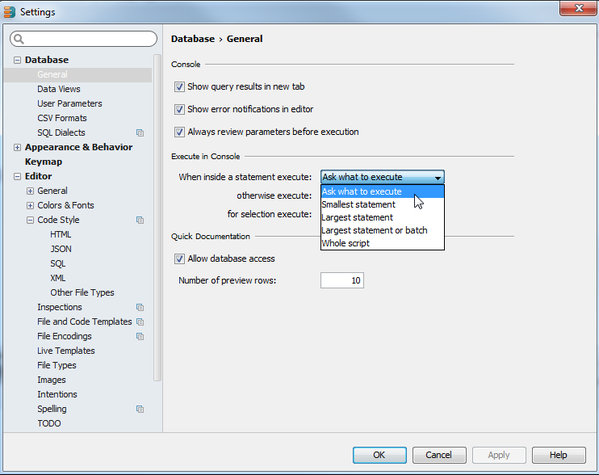
I execute the script as whole or selected all statements, so all statements are sent as a single batch.
![]()
Here is the settings dialog.
Attachment(s):
Screen Shot 2016-01-11 at 11.26.11.png
Check first that