Gemfile with a git based gem fails on Mac OS X 10.6.6

I searched around and found instructions on how to setup environment variable for Mac OS X. http://devnet.jetbrains.net/docs/DOC-1160
I followed the instructions for Mac OS X 10.6+. I also checked my settings for git in RubyMine and the path is correct.
However, when I run the bundler from within RubyMine I receive the following error:
/usr/bin/ruby -e $stdout.sync=true;$stderr.sync=true;load($0=ARGV.shift) /usr/bin/bundle install
Fetching git://github.com/durran/mongoid-rspec.git
An error has occurred in git when running `git clone "git://github.com/durran/mongoid-rspec.git" "/Library/Ruby/Gems/1.8/cache/bundler/git/mongoid-rspec-12873474abfda83123c050932e389c6d2ecd3995" --bare --no-hardlinks`. Cannot complete bundling.
sh: git: command not found
Process finished with exit code 11
Any help would be appreciated.
请先登录再写评论。
I ran "bundle install" from the command line and it worked, as expected. Subsequent "bundle install" call from within RubyMine also now work, likely because now the git repo has already been cloned.
It would be nice to be able to do everything from within RubyMine.
Hello David,
Could you create script which outputs PATH env variable, e.g.:
and launch it using RubyMine.
Did you logout and login after I had changed environment variables?
Log in and log out of what? My Mac?
Exactly, see note in "Environment Variables" preference pane - "Changes take effect the next time you log in"
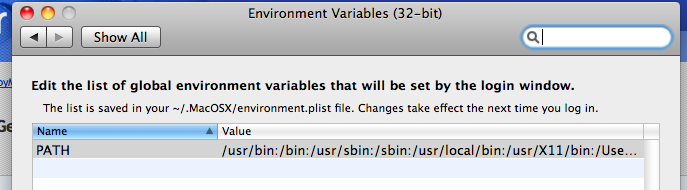
Sorry but I am still unsure as what actually needs to be done to get this working. :(
I to have a :git => "repo" in my Gemfile however RubyMine throws the same error that David was receiving. Sorry but if the solution has been posted it is a little vague to me and I am not sure what to do.
Thanks,