cant run a single test in rubymine

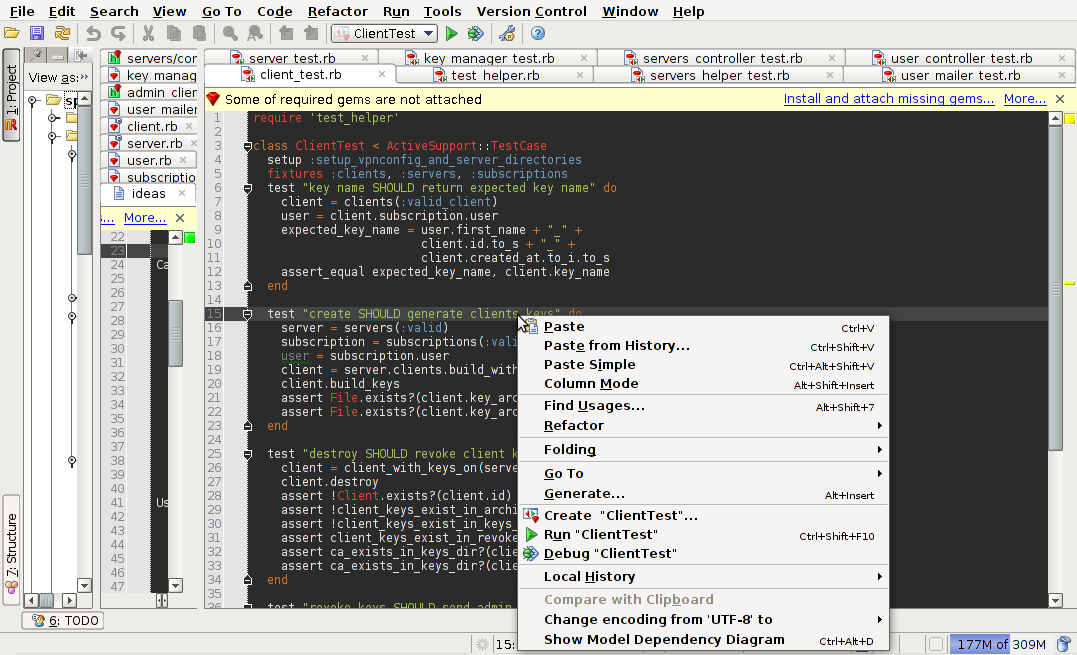
When i right click on a test method in my
UserTest < ActiveSupport::TestCase
there is no option to run only that single test. The only run option is for the whole file it self i.e. Run "UserTest"
Ive read old posts and ive checked my project settings like they mention. Can anyone help?
(PS ubuntu wont let me take a snapshot when i have the right click context menu open in rubymine. Anyone know of a fix / workaround to this?)
EDIT replaced old screenshot with new one of context menu
Attachment(s):
Screenshot--home-rails-railsprojects-spreedly - ...-test-unit-client_test.rb - JetBrains RubyMine 2.0.1.png

Screenshot--home-rails-railsprojects-spreedly - ...-test-unit-client_test.rb - JetBrains RubyMine 2.0.1-1.png
请先登录再写评论。
Hi Adam,
You can use standart Gnome application Applications | Accessories | Take ScreenShot.
Select the Grab the current window opt and setup grab delay. This should grab context menu.
Hope this help,
Oleg
Thanks for the tip Oleg! Ive replaced the old screenshot with a new one now showing the context menu. Any clues as to why i cant run a single test. Im assuming there will be run option with the test name somewhere in the context menu.
Adam
Adam,
I've filed an issue - http://youtrack.jetbrains.net/issue/RUBY-5734
fix will be available in RubyMine 2.0.2