Spellchecker: turning it off is not intuitive

So, I had to look at the help file to figure out how to turn off spellcheck - because the option wasn't in the "spellchecker" menu in the options, but in the "inspections" menu. I understand that there is a specific way of thinking about this to keep it all neatly integrated, but couldn't we have a "turn off all spellchecking" option in the "spellcheck" menu? Appropriate warning of "Hey, you do that, and we won't help you, it's just you and the keyboard", of course.
请先登录再写评论。
Hello Aldric,
The option is in fact there. Just press the right arrow key on any spellchecker
suggestion.
--
Dmitry Jemerov
Development Lead
JetBrains, Inc.
http://www.jetbrains.com/
"Develop with Pleasure!"
Dmitry, I'm not sure I follow you.
I only found one place where I could disable the spellchecker:
Options > Inspections > Spelling > Typos (and disable that).
Doing a right-click on a word suggested as a misspelling only offers me the option of adding the word to my custom dictionary.
I only feel that a hint in the almost-empty "spellchecking" option panel that further spelling options can be found under "Inspections", at the least, would be helpful. I don't think it's normal to have to look at the help file to find out how to disable spellchecking.
Of course, if I understand the software, then I don't need to look at the help file, because then I know how to think about the action I want to accomplish.. But I've been using Rubymine for less than a week. I like it enough that I already bought a license; But, I also think that "how to customize spellchecking" is not intuitive - because it's not where one thinks it should be.. Under "Spelling".
When you see a misspelled word, you can press Alt+Enter on it to open quick-fix menu (this is the standard for every inspection in RubyMine)
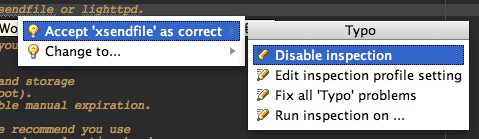
For every quick-fix shown you can open it's options if you press 'Right Arrow' (see screenshot attached)
Hope this makes it clearer,
-Eugene
Hello Aldric,
Most of quickfixes for inspection warnings can be accessed by pressing Alt-Enter,
not by right clicking. In the Alt-Enter menu, the right arrow key gives you
an option to disable spellchecking.
The current "Spelling" options panel is confusing indeed, we'll fix that.
Options>> Inspections > Spelling > Typos (and disable that).
Options>>
--
Dmitry Jemerov
Development Lead
JetBrains, Inc.
http://www.jetbrains.com/
"Develop with Pleasure!"
Oh, sure - design the perfect IDE, why don't you.
I'll be over here, reading the instruction manual...
*shamed*