Linux font anti-aliasing

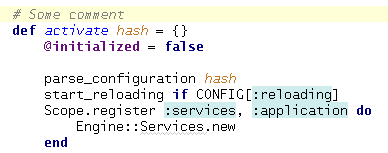
Hello, i can't set nice (anti-aliased) font for Rubymine running on Debian Lenny + KDE 3.5.X.
Default font/look settings or my custom setting have both bad looking (not anti-aliased) font.
Screenshot in attachment.
Settings > Editor
Override default fonts by (Deja Vu Sans, 12)
Look and Feel (Alloy, Bedoin Theme) (i tried differend but it doesn't helps)
Settings > Editor > Appearance
Use antialiased font (enabled)
Is there any way to make it antialiased?
Attachment(s):
font.png
请先登录再写评论。
Solution: http://forums.debian.net/viewtopic.php?f=10&t=39790
Alex,
Thank you for the solution!