How I can I get the ManageProjectManager instance?

How can I get the MavenProjectsManager instance?
1. Is there a service, component or something else that goes in the plugin.xml to instantiate the MavenProjectsManager instance?
MavenProjectsManager manager = MavenProjectsManager.getInstance(project);
My plugin.xml file so far:
<idea-plugin version="2">
    <id>com.arcbees.plugin.idea</id>
    <name>GWT-Platform (GWTP) IntelliJ IDEA Plugin</name>
    <version>1.0.0</version>
    <vendor email="support@arcbees.com" url="http://www.arcbees.com">ArcBees</vendor>

    <description><![CDATA[
      The GWTP IDEA plugin provides tools for GWT-Platform framework in IntelliJ IDEA.<br>
      ]]></description>

    <change-notes><![CDATA[
      Project Creation by Archetype added (8/30/2013).<br>
      ]]>
    </change-notes>

    <!-- please see http://confluence.jetbrains.net/display/IDEADEV/Build+Number+Ranges for description -->
    <idea-version since-build="107.105"/>

    <depends>org.jetbrains.idea.maven</depends>

    <application-components>
    </application-components>

    <project-components>
    </project-components>

    <actions>
    </actions>

    <extensions defaultExtensionNs="com.intellij">

        <moduleType id="GWTP_CREATE_PROJECT_MODULE"
                    implementationClass="com.arcbees.plugin.idea.moduletypes.CreateProjectModuleType"
                    classpathProvider="true"/>

        <wizardMode implementation="com.arcbees.plugin.idea.wizards.createproject.CreateProjectWizard"/>

    </extensions>

</idea-plugin>
Thanks to all those who can help,
Brandon
请先登录再写评论。
Please make sure that you're adding the jars of the Maven plugin to the classpath of the IntelliJ IDEA SDK and not as a separate project library.
Thank you! I had mistunderstood the depenedency locaitons for including a thirdparty plugin. It works now.
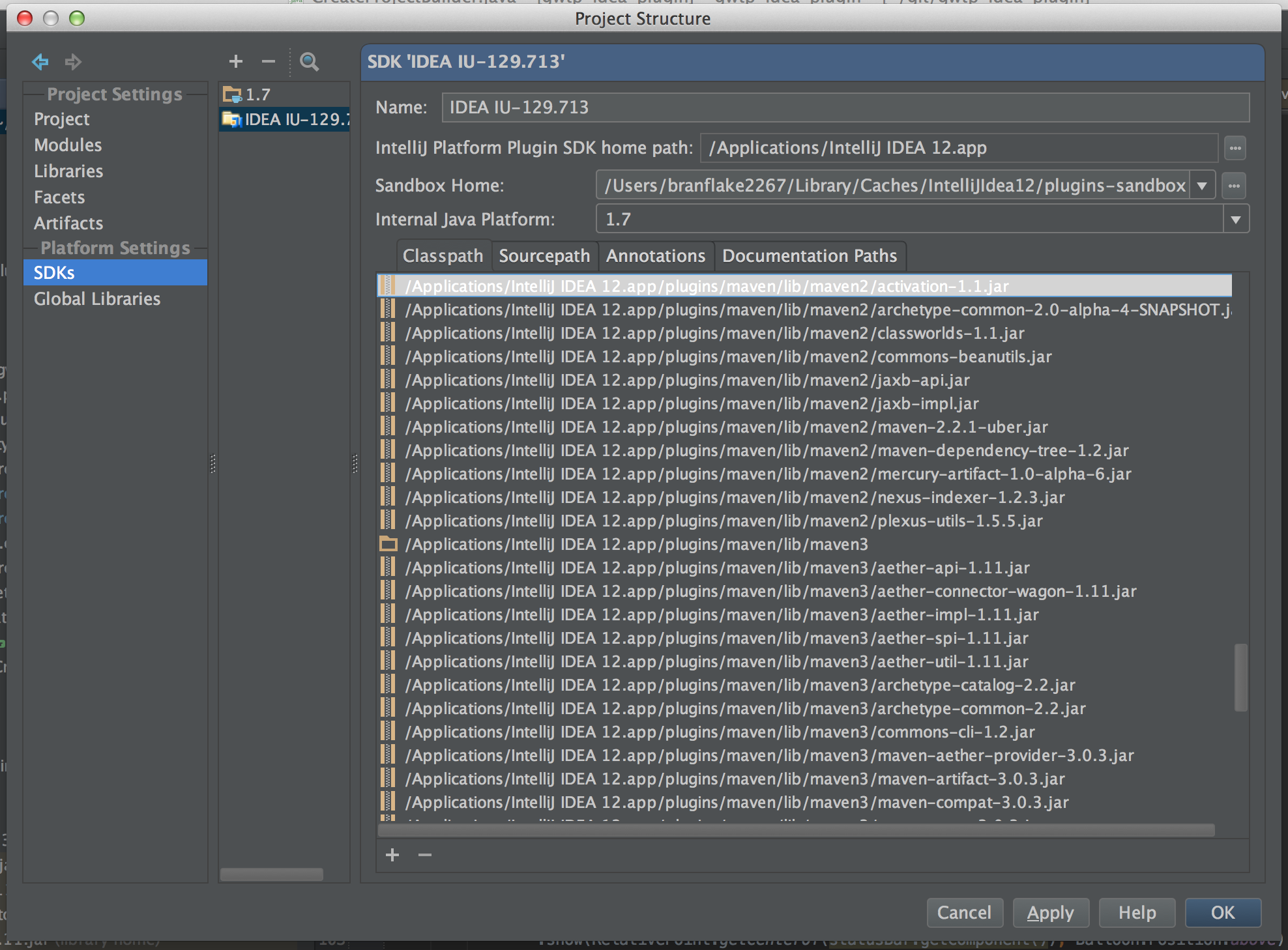
For those who follow, I attatched a screen shot of the location I added the maven plugin dependencies. On a mac they are located in the application, /Applications/IntelliJ IDEA 12.app (show package contents).
I've run into a similar problem
I'm writing a plugin using IntelliJ SDK via the gradle-intellij-plugin.
I was able to add the dependencies so far, but now that I'm trying to add Maven/Gradle dependencies they are not seen by the IDE.
I then found this post and added the jars to the SDK's classpath, but still nothing changed.
Any hint?
Ok, got it. If I use the gradle plugin I must do
intellij {
    version = '20xx.x.x'

    plugins 'Maven', 'gradle'

}
Ok, the previous resolves the depends tag in the plugin.xml
However, I still cannot import classes. E.g.

I've create a specific request here: https://intellij-support.jetbrains.com/hc/en-us/community/posts/360002396080-How-can-I-import-Maven-and-Gradle-bundled-plugins-in-my-IDE-using-gradle-intellij-plugin