Tomacat 7, start don't work as command line start ?

Hi,
First of all, sorry for my bad English...
I just get Intellij Idea in trial to try it in real project, and maybe buy it.
I download a tomcat 7 server, and I try start it with command line "/Volumes/HDD/Workspaces/tomcat-7.0.27/bin/catalina.sh run", and all is OK, I could access to my project with http://localhost:8080.
I configure tomcat server in Intellij Idea, choose my tomcat home directory. In deployment tab, i choose my war, and in startup / connection tab I see that "Startup script" is the same command line that I run in my terminal.
But when I start tomcat with intellij there is not the same starting trace in the console, et finally it start very fast and http://localhost:8080 give me a blank page.
Could you help me for this problem ?
Thanks you.
Regards, Nicolas.
请先登录再写评论。
Hi Nicolas.
Could you please reply on the following questions:
1. Is it Local or Remote configuration of the TomCat?
2. If this configuration is local, is it running already on your local machine? (Stop the server before launching the deployment with IDEA)
3. What messages do you receive while starting the server through the IDEA?
(Could you please also attach the screenshot of your current configuration for this server?)
BR,
Kirill
Hi,
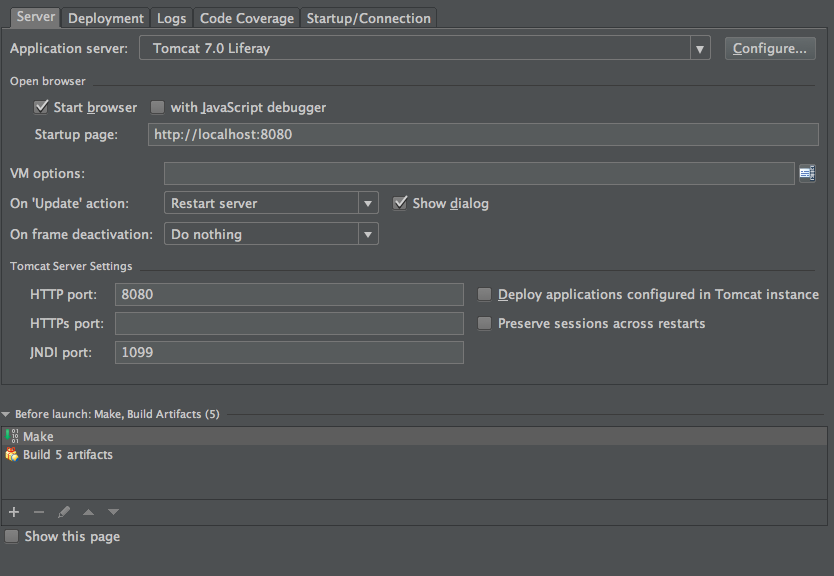
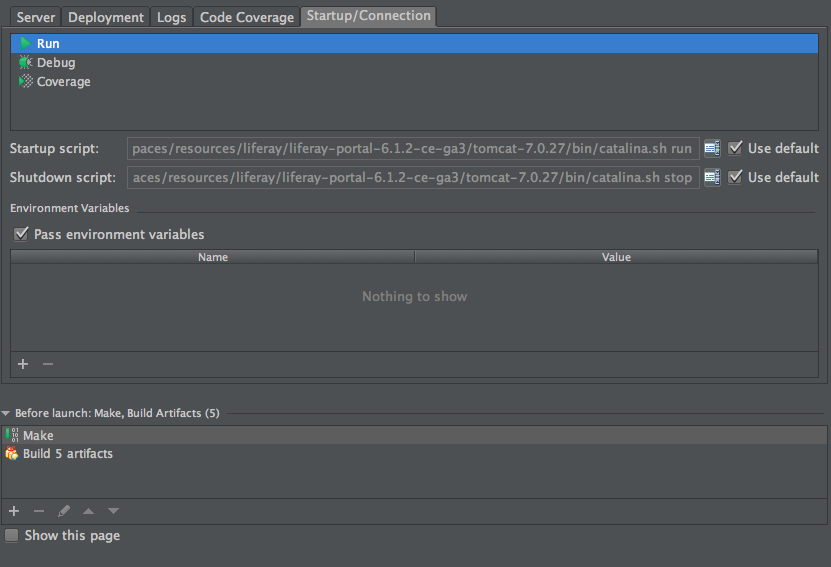
Thanks you for your answer, for the first point, it's a local configuration of the tomcat.
The server is realy stop when I try to start it in intellij idea.
You can see my configuration here :
The starting trace :