Ctrl+F12 in JS files - clicking function's name doesn't "go" there

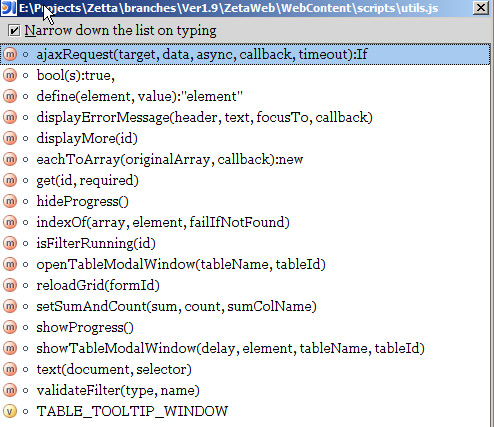
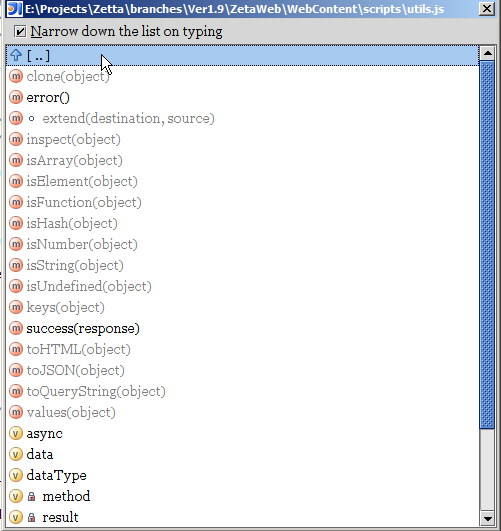
That's an old one - after displaying all JS functions in a JS file with CtrlF12 and clicking function's name - function's variables are displayed instead of jumping to function's code. See images attached - "1.png" is after CtrlF12, "2.png" is after pressing Enter or clicking function's name
8445, WinXP
Attachment(s):
1.png
2.png
请先登录再写评论。
Actually F4 is needed for navigation for composite objects
Evgeny Goldin wrote:
--
Best regards,
Maxim Mossienko
IntelliJ Labs / JetBrains Inc.
http://www.intellij.com
"Develop with pleasure!"
But then Ctrl+F12 behaves very differently when opened in a Java and JS file. In Java I go to method with Enter/click but in JS it suddenly becomes F4 ?
Isn't it awkward ?
Remember that in javascript, a method is also an object, and might have properties of it's own.
That's right. But navigating to it became less comfortable now, that's the point. When I hit Ctrl+F12 - most of the time I don't care much about method's properties and local variables but just want to jump to it.
It is the same in Java, just press enter on inner class node :)
Evgeny Goldin wrote:
--
Best regards,
Maxim Mossienko
IntelliJ Labs / JetBrains Inc.
http://www.intellij.com
"Develop with pleasure!"
Right, in Java 5% of the time when I "Enter" something in Ctrl+F12 window - I drill-down to a deeper level. But 95% of time clicking something (mostly, function name) just takes me there. While in JS 100% of time clicking function name takes me to a deeper level I'm very-very rarely interested in.
So it still seems different to me.
I think local variables should not present in that view, so function
navigation will become more convenient :)
Evgeny Goldin wrote:
--
Best regards,
Maxim Mossienko
IntelliJ Labs / JetBrains Inc.
http://www.intellij.com
"Develop with pleasure!"