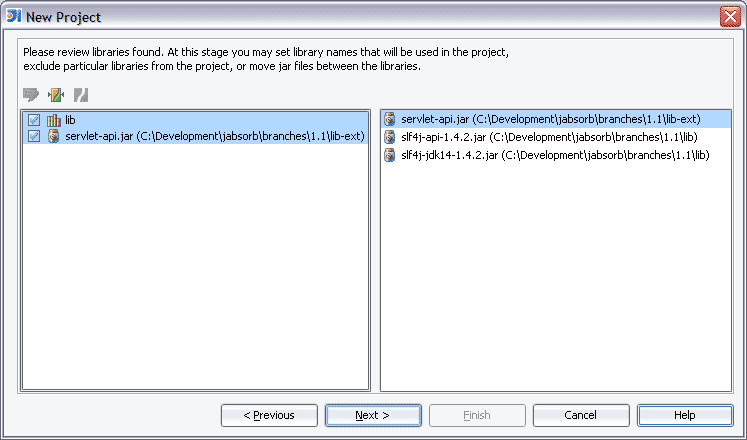
add new project... library dialog is confusing

I find the dialog for configuring libraries when creating a new project
to be very confusing.
It took me a while to figure out that the right pane is just a display
of libraries in the folder from the left pane. And the icons are so
sparsely documented ...
I think just beefing up the text at the top to explain things better and
giving more of a visual indication that the libraries on the right are
part of the folders on the left (like maybe using a tree view instead)
would go a long way towards making this dialog more useable.
Just wanted to give my feedback...
Attachment(s):
confusing.gif
请先登录再写评论。
Hello Arthur,
I strongly argee. Every time I see this dialog (which is not that often)
I'm lost.
Let's start with something trivial: the button icons in the dialog. They
are not intuitive/descriptive at all.
Taras
Taras Tielkes wrote:
>> I find the dialog for configuring libraries when creating a new
>> project to be very confusing.
>>
My vote too. When I first used this dialog, I thought that I'm adding
jars/classes to module, not to the library.
Yep, we've added titles and corrected single-jar library icons in the left panel
--
Best regards,
Eugene Zhuravlev
Software Developer
JetBrains Inc.
http://www.jetbrains.com
"Develop with pleasure!"
"Arthur Blake" <no_reply@jetbrains.com> wrote in message news:fdbbgt$eng$1@is.intellij.net...
>I find the dialog for configuring libraries when creating a new project
>
>
>
>