What's the status of Meta key support for the Emacs keymap

I'm using phpStorm 6.
When I go to Preferences > Keymap and set the Emacs keymap I see that Move Caret to Previous word should work with Option-B on MacOS. (Attached screen clip.) When I use Option-b I get "∫". Option-f does work to move forward one word. Option-w to save to kill ring doesn't work.
I also tried to reassign the keys, but I can't figure out how to make Option or Command the first keystroke.
Is this a configuration issue on my part, or is this functionality not complete in phpStorm 6?
I found these:
http://youtrack.jetbrains.com/issue/IDEA-104295#tab=Comments
http://youtrack.jetbrains.com/issue/IDEA-91796
I gues there is no way to vote on an issue?
Attachment(s):
Screen Shot 2013-04-13 at 8.22.17 AM.png

请先登录再写评论。
Hi Brian,
The ide doesn't allow to map one key to another and we don't have plans for trying to support that.
An official workaround is to create your custom keymap and map actions to target hotkeys there.
Denis
Hi Dennis,

Thanks for your reply. I am not necessarily interested in mapping one key to another.
In the key map dialog I see this to the right of "Move Caret to Previous Word:
I think that the symbol preceeding the "B" represents the Option key in MacOS. Am I correct? If so, I would expect the cursor to move backwards one word when I press Option-B, : but instead when I press Option-B while editing a file this symbol appears: ∫. Is there some configuration I need to do in Mac OS to make the Option key work correctly in phpStorm?
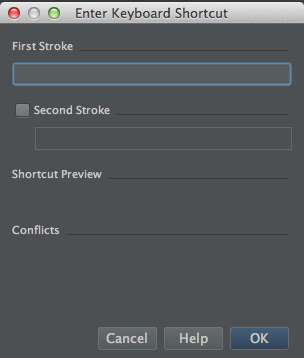
Also, I tried creating a custom keymap according to the manual link you provided. When I get into this Enter Keyboard Shortcut dialog:
and press the Option key with the focus on the First Stroke field, nothing appears. Shouldn't I see a symbol representing the Option key?
Thanks for your help.
Hi Briann,
Yes, that symbol stands for Option (you may have a look into IJ Mac OS keymap which provides information about that symbols).
It seems that Option+B is indeed intercepted at OS level, i.e. the ide doesn't receive that event as is when you press them. Sorry, can't check further because I'm not on Mac but I googled that a little and this page says that Option+B is one of standard Mac keyboard mappings.
As far as I understand, you can try to disable that at Apple menu | System Preferences | International | Input Menu
Denis
I haven't resolved the issue yet, but I've quickly tried Ukelele... http://stackoverflow.com/questions/11876485/how-to-disable-typing-special-characters-when-pressing-option-key-in-mac-os-x