Inspection UI Feedback (As of build 5646)

Hi,
I was playing with the Inspection UI, and noticed a couple more things.
*Issues #1 Lock toolbar button *
I really like the new Lock feature for the inspection profiles. (See attached
picture.) But it would be better if the Lock toolbar button wasn't used
to show the state. It should perform the action lock/unlock similer to how the
other toolbar icons add, delete, copy, and reset work. You should just decorate
the profile icon with the lock or unlocked symbol to the show state, consistent
with how file and class icons are decorated with lock/unlocked icon.
Issue #2 minor issue with setting the deafult IDE profile.*
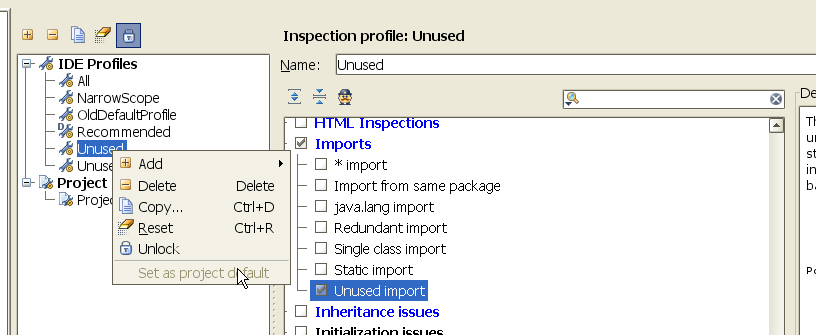
1) The right-click popup menu on an IDE profile has "Set as Project Default"
which is always disabled. Shouldn't this be "Set as IDE Default"?
2) My default IDE profile is decorated with a letter "D" in the upper left corner
of the icon, but my default project profile is not decorated.
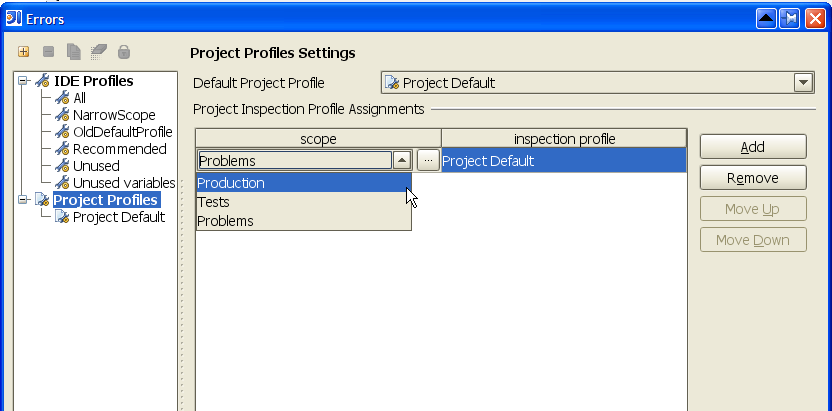
Issues #3 Selecting custom scopes in Project Inspection Profile Assigments*
I tried to set some Project Inspection Profile Assignments. What I found
was the scope choice allowed Production, Tests, and Problems. These seem to
be predifined scopes. If I clicked the "..." it popped up a scope dialog which
let me pick some of my custom scopes. However, after selecting a custom scope
and hitting OK, it didn't register on the Project Inspection Profile Assigments
table.
Maybe I'm not understanding how this works. The other quirk I noticed is that
if I have Default Project Profile set to "Use IDE Profile", then the Project Inspection
Profile Assigments are disallowed. I would have thought they would still be allowed;
They would take precedence over the default IDE profile. Any classes not covered by
a profile assignment rule would default to the IDE profile.
Issues #4 icon comments *
The icon you are using for the IDE profile is a generic wrench/gear, and the
project profile is a document decorated with wrench/gear in bottom-right corner.
Couldn't you just use the mr. inspector icon? That is how it is displayed in the
status bar that shows the current editor highlighting profile.
You are currently using mr. inspector icon for the 'show/hide global inspection'
toolbar icon. I would change that to a globe/earth icon to represent global, then
you can use mr. inspector for the profile icons.
Issue #5 CTRL+DELETE would be nice in search field box. *
Currently, the search editfield box doesn't support a user's basic editing keybindings.
Anyway, I think I brought this up before, and you mentioned to use ESCAPE key. The problem with this
is if you accidentally press ESCAPE twice, you cancel the IDE Settings->Errors dialog, which is very
annoying.
This isn't just a problem for IDE SEttings->Errors dialog, but all throughout IDEA there is this problem.
It would be great if you created an enhance IDEA TextField widget which supported user's
editor keybindings.
Issue #6 Search history dropdown appears after clear search field. *
A minor cosmetic issue is when you clear the search history either by deleting all the
characters or pressing the X icon, the search history dropdown list appears. I don't
think this dropdown list should appear since it doesn't appear when you first click in
the search field. Only after you starting typing the first letter does it appear.
Previous Discussion
-
Inspection UI Bugs & Enhancements (As of build 5561)
http://www.intellij.net/forums/thread.jspa?threadID=240249
Attachment(s):
5646_project_settings_errors_history_dropdown_after_clearing_list.png

5646_project_settings_profile_scopes.png
5646_project_settings_errors.png
请先登录再写评论。
Hello Alex,
With default modificator profile icon becomes like icons from Project View.
I am not sure that it is easy to understand them ... but I'll try ;)
Agree
Again you are right
Problems must be excluded and other are predefined scopes. If you've chosen
local scope (not shared) it can't be persisted on project level. There won't
be possible to do it. Thank you.
There is already special project profile for such cases.
I'll try. Thank you for suggestions
For clear filter/search we can do it easily ...
Thank you
I thought about this some more, and if mr. inspector looks too funny with
a "D" and a lock icon decorating him, you could just use a plain document
icon for the base.
So first thing I would try is:
1) change mr. inspection icon to a globe for the 'show/hide global inspections"
2) change inspection profile to a simple document icon, with D and lock
decoration icons.
That would look pretty good imo. You could then see what it looks like with
mr. inspection instead of the document icon, but it might look too funny...
Attachment(s):
class_icon_lock_decoration.png
Alex,
What about distinguishing between project/IDE profiles? ;)
Thanks
Alex wrote:
I also think the history dropdown is sorted the wrong way round. The
most recently typed search queries appear at the bottom, they would be
more useful if they appear at the top.
Bas
Also, try shrinking the window smaller than the default size. You end
up with confusing nested scrollbars, one down the right-hand side which
moves the entire definitions panel and one which moves the inspections
selection. The right-hand one should not exist, sub-panels should have
their own scroll bars if and when necessary.
R
Hello Robert,
Those are artifacts of the attempt to make it possible to view settings on
low-resolution screens like 800x600
-
Maxim Shafirov
JetBrains, Inc
http://www.jetbrains.com
"Develop with pleasure!"
Alex,
Clear text action now available in group others.
Default binding is Escape ;)
Maxim - is 800x600 really that common anymore?
Nick
I don't want another keybinding. I want IDEA's textfield to respect the user's existing editor keybindings.
Jetbrains needs to create a custom TextField which supports a select set of
editor actions. Bascially, any editor actions which operate on a character, word, or single line of text.
Backspace
Delete Line at Caret
Delete to Word End
Delete to Word Start
Move Caret to Next Word
Move Caret to Previous Word
Move Caret to Text End
Move Caret to Text Start
Select Word at Caret
Unselect Word at Caret
The above editor actions should be camel case aware, just like in
the editor. Also, all keybindings attached to each action should be supported.
For example, I use CTRLA and CTRLE for Move Caret to Text Start
and Move Caret to Text End in addition to Home and End keybindings.
I would like this behavior with all the IDEA TextFields. The lack of CTRL+DELETE
in particular has been annoying on some of the search dialogs.
Hello Nick,
Nope. But 1024x768 is.
-
Maxim Shafirov
JetBrains, Inc
http://www.jetbrains.com
"Develop with pleasure!"
I have filed a Jira request for this issue, as it a basic UI problem and not specific to the Inspection UI. Also, I can make a much stronger case for supporting a user's editor keybindings in the search/replace dialogs where the "Text to find" and "Replace with" are often code snippets where things like camelcase aware navigation and editing are expected. (See attached example)
IDEA TextFields should support user's basic editing keybindings like Delete to Word Start, Select Word at Caret, etc. and CamelCase support
http://www.jetbrains.net/jira/browse/IDEA-9198
Attachment(s):
5650_scenario_for_editor_keybindings_in_search_window.png