Deprecated annotation seems don't work.

Hi All,
I'm new with using Intelli Idea and i have a little question. I m using the 11.1 Ultimate and i'm wondering why when i use the @Deprecated annotation i have no information shown despite on eclipse.
@Deprecated
class MaSousClasse {
/**
* This is shown in eclipse but not on JI
* @deprecated methode non compatible
*/
@Deprecated
public void maMethode() {
System.out.println("test");
}
Does someone know how to make it work?
I was trying this IDE and it'a shame to let it Go for such little thing ;\
请先登录再写评论。
What information do you expect to see? IntelliJ IDEA marks deprecated classes and methods with a strikethrough over the name.
it had to show the green lines like javadoc when in put the mouse over the strikethroug.
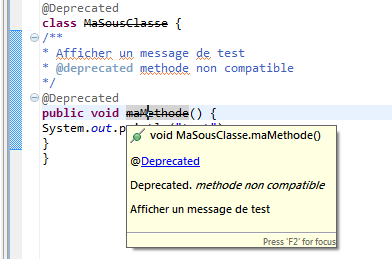
As shown Below (with Eclipse).
In IntelliJ IDEA, JavaDoc for a method is displayed if you press Ctrl-Q (View | Quick Documentation), not by hovering over a method. This difference in behavior has nothing to do with whether a method is deprecated or not.
thank you for your help, I see it now. I am sorry if my question was kinda of stupidity, i thought it was like Eclipse.
Thank you again.