How to add a property file to a project/module ?

Hi everybody,
Sorry for the dumb question but I did try to find the answer by myself to no avail.
A friend of mine convinced me to try IDEA. I'm trying the latest Community Edition build.
BTW I find it spectacular and will try as soon as I can to convince my boss to grab a couple of licences.
Unfortunately there's one simple thing I can't do (coming from Eclipse).
How on earth do can I tell IDEA to consider my property files ?
My project makes use of two of the usual suspects: log4j.properties and resources.properties.
In my Eclipse project, they all sit in a resources directory.
I haven't been able to run my (simple) project.
Any idea (sorry) on how I can do that ?
Thanks a lot,
Farid
PS: I run the mac version under 10.6.5 with the stock Apple JVM 1.6
请先登录再写评论。
Hi Farid,
You should mark as a source root directory where target files are located.
Regards, Denis
Hi Denis,
You mean like this (see attached picture) ?
That's the first or second thing I did but no result...
Attachment(s):
Capture d’écran 2010-12-03 à 14.55.32.png
Yes, I was talking about marking 'resources' directory as a source root.
Could you provide more information on what do you want to achieve then? 'How can I tell IDEA to consider my property files' looks little unclear :(
Denis
Hi Denis,
Sorry for being so little unclear.
I did add the resources directory as source file, but when I want to access said properties, log4j.properties or my own resources.properties, I can't run the following code
public static void main(String argv[]) {
PropertyConfigurator.configure("resources/log4j.properties");
properties.load(new FileInputStream("resources/resources.properties"));
properties.load(this.getClass().getResourceAsStream("resources/resources.properties"));
}
I get a java.io.FileNotFoundException :-(
Is there something else to do (I didn't find it) to ensure that when ran in the IDE, the code finds the resources ?
Thanks again for your time,
Farid
Hi Farid,
Marking 'resource' directory as a source root adds its content to the class path, not the directory itself. That means that target resources can't be accessed via paths like 'resources/log4j.properties'. You should use 'log4j.properties' path instead.
Denis
Hi Denis,
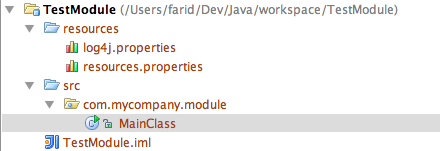
It still doesn't work.
I created a simple project and the module still doesn't find the resources.
Here is a snapshot of the structure of the module and my main class.
I tried changing the settings of the ouptut path and so on but again, to no avail.
Thanks again,
Farid
Hi Farid,
That is expected behavior because PropertyConfigurator.configure(String) assumes that given argument defines config file path at file system.
However, marking 'resources' directory as a source root makes its content available from classpath. Classpath != file system path.
Solution:
Regards, Denis
Thanks Denis,
But the problem still remains for the resources.properties file.
I can't access the "resources.properties" file.
Farid
Hello,
What do you mean under 'can't access the "resources.properties" file'? What are you trying to do with it?
Denis
Just that I try to load the properties and I have an excpetion saying that I can't...
Farid
Am I right assuming that 'Just that I try to load the properties and I have an excpetion saying that I can't' == trying to execute PropertyConfigurator.configure("resources.properties")?
Denis
No Denis, I'm sorry,
it's just that I'm trying to load some properties of my own in my own resources.properties files which I put in the resources directory.
Whatever the method used to load the properties, I can't do it.
PropertyConfigurator.configure("log4j.properties"); doesn't work
properties.load(this.getClass().getResourceAsStream("resources.properties")); doesn't work.
It seems the resource file can't be found (not in the classpath ?) but the log4j.properties file is.
??
Thanks again for your patience,
Farid
I created minimal standalone module that illustrates accessing resources from classpath. If you start main class you see that resources are successfully loaded.
Please try it and let me know if you have any difficulties with it.
Denis
Awesome !
Thanks Denis.
I know I could use ResourceBundle instead but I'm working on legacy code.
Thanks again...
If you ever come to Paris, France, let me know so we can have a drink ;-)
Farid from Paris, France
Ok, thanks :)