Context menu for "Open Explorer", "Open Command Line", and "System Open"

This topic has come up a while before, but it's buried in another discussion.
I post it here again, so that I will be able to find it again on my next fresh install of Idea ;)
You can simply add external tool definitions to get these features in the context menu.
Open Settings->IDE->External Tools and add definitions like in the attached screenshots.
Or simply open the xml file in Idea's config/tools folder and add the tool definitions like this (while Idea is not running):
]]>
Attachment(s):
commandLine.png
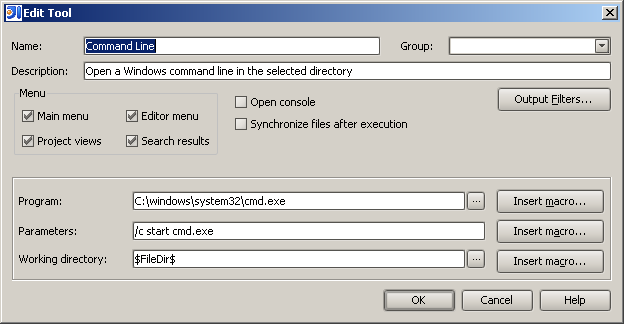
explorer.png

systemOpen.png

请先登录再写评论。
I have a different "System Open" using shell32.dll. There is a nice trick with that to get "System Open With...". All Windows only of course.
The Native Neighbourhood plugin is also a quick way to get the same functionality.
Bas
Attachment(s):
system_open.png
system_open_with.png