Can't get rid of margins?

Hi,
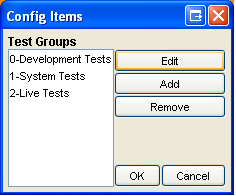
I have a JPanel (configItems) created using the GUI designer. I also have a
JDialog into which I setContentPane(configItems). As you can see in the
first image attached (configitems.bmp) - the JPanel has a margin around it
but I have set margins to 0,0,0,0 in the GUI designer? I want to get rid of
this margin but I cannot find where it is set?
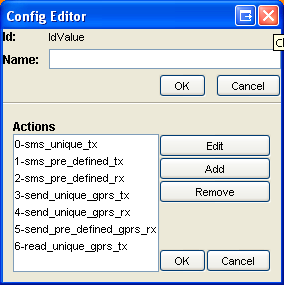
The problem is, I have another JDialog with a diffierent JPanel
(configEditor) set as its contentPane and it shows up without the margins
when I run it (see image two configeditornoinset.bmp).
The reason this margin is a problem is clear when the second JDialog with
configEditor is enhanced with the configItems JPanel. The configItems JPanel
has a huge margin around it (making all the items appear centered) whereas
the items from the configEditor panel (at the top) have no margin whatsoever
(see image three configeditorwithinset.bmp)?
I can provide source code/forms etc if required but any help would be
greatly appreciated!
Thanks
Scott Curtis
Attachment(s):
configeditorwithinset.bmp
configeditornoinset.bmp

configitems.bmp
请先登录再写评论。
Sorry the images were attached in the wrong order. Please go by image name?
thanks
scott
"Scott Curtis" <scurtis@smart421.com> wrote in message
news:cjbek9$tqe$1@is.intellij.net...
>
a
of
>
>
JPanel
whatsoever
>
>
>
>
>
Scott, a small tip: always use (application-constant) space between your
components. It will look much better.
Tom
Eh? If you mean the spaces between the items - I was just messing around
with Horizontal and Vertical Gap attributes and didn't expect that to appear
in the images?
If you didn't mean that, I would be interested to know what you meant, as I
am new to this GUI malarkey and I agree - they look pretty dodgy! :)
"Thomas Singer (MoTJ)" <nomail@nodomain.com> wrote in message
news:cjbg4i$jmh$1@is.intellij.net...
>
I have found the solution. There were a couple of nested JPanels that I
didn't notice and it seems these were putting a default margin around the
JPanels they contained. Not sure what was going on there?!?
- scott
"Scott Curtis" <scurtis@smart421.com> wrote in message
news:cjbenb$upl$1@is.intellij.net...
name?
>
>
have
it
margins
with
whereas
>
>
Hi Scott,
Please take a look at the attached screenshots. The file
"screenshot.png" show the dialog in the final state. "jformdesigner.png"
shows it in the GUI designer, which should make the gaps obviously
visible, especially, because they are separate rows/columns in the used
FormLayout.
Tom
Attachment(s):
screenshot.png
jformdesigner.png
I must try that Eclipse editor? It looks pretty good.
Thanks for explaining. I have set the default gap now and all my elements
line up beautifully!
- scott
"Thomas Singer (MoTJ)" <nomail@nodomain.com> wrote in message
news:cjbph9$kub$1@is.intellij.net...
>
>
>
-
-
-
-
It's not an "Eclipse editor", it's plain Swing in a standalone
application. Check it out yourself at www.jformdesigner.com .
Tom
I gotta plug this tool, I really have enjoyed working with it. It's what the IDEA GUI builder should have been. In a perfect world, JetBrains would integrate the JFormsDesigner into IDEA.
Tobin
I just downloaded this and my first impressions are quite good. I can't wait to play with it some more. It looks way slick.
That looks amazing! I can't wait until it is integrated with Idea. It is so
much easier to use and far more intuitive than Idea's GUI designer.
"Thomas Singer (MoTJ)" <nomail@nodomain.com> wrote in message
news:cjbsjt$e6g$1@is.intellij.net...
>
JFormDesigner definitely looks great and seems to be more usable than the one, integrated in IntelliJ.
It would be extremely good, if JetBrains would spend some effort to let the planned integration (see road map on web site via Plugin ??) become a first priority.
I agree that the IntelliJ UI-Designer should have looked like JFormDesigner from beginning.
Regards
Thomas Gülden
Munich, Germany