Warnings on new NodeJS project

I just downloaded WebStorm7, created a new NodeJS project and set the NodeJS settings and WebStorm is giving me warnings all over the place.
I have not written any code! This is all the WebStorm template code.
With all the warnings, the app runs fine, so it seems like WebStorm can't figure something out.
The first being, in the app.js file, there are numerous warnings about number of parameters being incorrect and methods not found.
Below is a pick the app.js file, the external dependencies and the NodeJS settings.
How do I get WebStorm the info it needs to stop giving me all these warnings.?
app.js:
External Dependencies: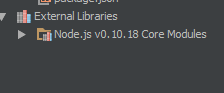
NodeJS Settings: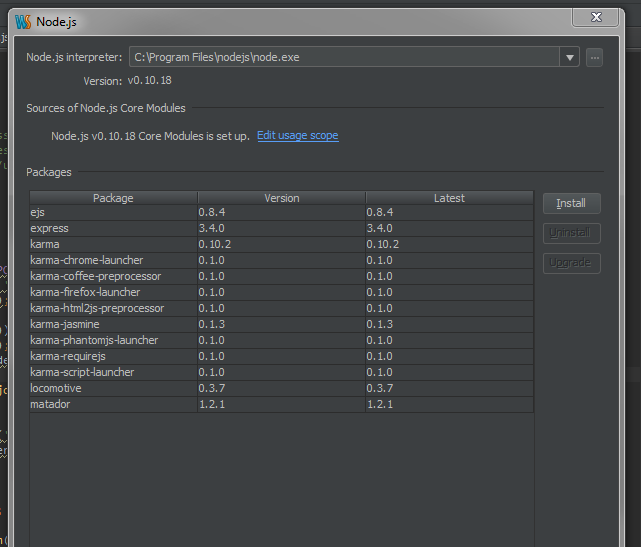
请先登录再写评论。
Hello!
it's a known issue (2 issues actually) - please check http://youtrack.jetbrains.com/issue/WEB-6922#comment=27-453366
I just tried the same thing. Downloaded the demo to see if I would like using Webstorm for NodeJS devleopment. First I tried to create a Node.JS Boilerplate project. When running the bat file to install the project it seems to throw a bunch of errors then exits. OK well that has a lot of extra stuff I won't need anyway so I tried the Node.JS Express App project which is more in line with what I'd need. That one seems to work and run without any changes, but I have the same problem as the OP. The base project is riddled with "Unresolved function or method" and "Invalid number of parameter" warnings all over the place. I didn't change anything or write one line of code.
Is this going to be fixed and soon? The app does run, but it makes a hard case to want to pay for the IDE when it doesn't work right out of the box. I don't really want to be writing code in an IDE that is going to be riddled with warnings all over the place. How will I know which ones are valid? Is the Create New Project functionality the problem?
I like some of what I've seen so far, but I'd like to know what the chances are of this being fixed before the 30 day trial runs out.
Thanks.
Its definitely frustrating, but I ended up turning off some of the JavaScript inspections. It does not seem to hurt the day to day coding process and gets rid of the warnings.
From the settings, select Inspections, the JavaScript / General and uncheck "Signature Mismatch Problem" and "Unresolved JavaScript Function".
Considering how "dynamic" JavaScript can be, I can understand the difficulty in getting this to work. In the mean time I have turned of the inspection settings related to the problem.
From the settings, select Inspections, the JavaScript / General and uncheck "Signature Mismatch Problem" and "Unresolved JavaScript Function".
This error started occurring with Webstorm 2020.1 update. Did not occur with identical code in prior versions. Just updated again to 2020.1.2 and it is still there.
I get signature mismatch errors on half of my express router route declarations and cannot figure out or isolate any differences between methods. I have tried invalidating caches, and obviously updating Webstorm. I really do not like having to disable the inspection. Can someone advise on this?
syntax is exactly the same
router.get( '/route/one', controller.methodOne)
router.get( '/route/two', controller.methodTwo) // <= displays error even if it is moved up, no significant difference in methods.
Both controller methods accept the same identical request and response parameters that one would see in thousands of express apps.
Other details:
Using JavaScript require module syntax.
NodeJS v12.16.3
Windows 10 Pro
Do you have typings (
d.tsstubs) installed?expressmethods are generated dynamically in runtime, so they can't be resolved during static code analysis. Installing TypeScript stubs should help to get methods likeget(),put()etc work: put cursor on'express'inconst express = require('express');, hitAlt+Enterand choose Install TypeScript definitions for better type information to install typings - see https://www.jetbrains.com/help/pycharm/configuring-javascript-libraries.html#ws_jsconfigure_libraries_ts_definition_filesApologies for lack of description, I briefly thought to mention I already had definition files in my project, but left out that detail.
Yes, both in previous versions and the latest I had/have definition files installed. The behavior changed when updating to 2020 version of Webstorm.I can also say with confidence that there were zero code changes during the update and I noticed the "Signature Mismatch" warning immediately. I first thought maybe there is something I can do with adding to existing definitions but the methods are so similar there is no real variation in the signature. This makes me think that Webstorm is evaluating the method incorrectly in some cases due to some nuance i cannot detect.
Also had/have the coding assistance for Node.js checked in both cases
Try removing and then re-adding typings - does it help?
Hi Elena, I tried this. With removing all type definitions the "Signature mismatch" error does go away but then I am asked to define the get and post methods.
Adding definition files back in, Webstorm now understands the get and post methods, but again warns of signature mismatch. Thank you for your interest and assistance with this Elena.
can you repeat the issue in a new Express project?