The colors aren't just in the diff, they're in the CSS file itself when you open it as well. The colors in the sidebar are present whenever a color code is present, such as #FFFFFF, #000000, etc. I've seen it for color: and background-color: and probably others.

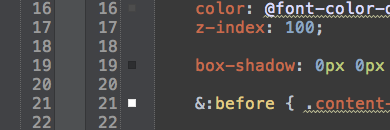
The colors aren't just in the diff, they're in the CSS file itself when you open it as well. The colors in the sidebar are present whenever a color code is present, such as #FFFFFF, #000000, etc. I've seen it for color: and background-color: and probably others.
Hi there,
You can disable these "color previews" in Settings | Editor | Appearance | Show CSS color preview icon in gutter