php inspection & code completion not working on 6.02

Hi Guys,
I'm using PHPStorm for years now but haven't upgraded since 4. Now I'm trying 6.0 (and just go the 6.02 upgrade) and I still see the same behaviour
Code insight (not sure if called like that) is working fine, so I can see parameters when typing function calls.
But this is not working:
* code completion (ie, without me hitting ctrl-space to show me that function names that are available - worked just fine in 4.0)
* inspection or php errors, ie undefined variables and other stuff. I can't get this to work at all)
I've played through the settings, and have tried what I can, but I can't get it to work.
As said, it's working fine on 4 and not working on 6. Files are all ending with .php and I haven't seen any instance of above that works in any file that I edit.
It does do the code highlight seeminly correctly, ie, strings, operators, functions etc.
It just doesn't do anything automatic.
Appreciate any help on this matter.
Tom
请先登录再写评论。
Hi Thomas,
Without any concrete examples (actual code and screenshot of how it works now) it's hard to say what kind of issues you are actually facing.
I suggest:
Hi Andriy,
sorry I didn't post examples but it's really straightfoward: It doesn't work. Create a blank php file and write
<?php
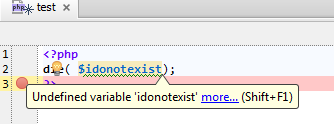
die( $idonotexist);
?>
And nothing gets marked in red.
Plus of course the boxes are ticked for code completion etc and 0 time out etc. I was trying to avoid the settings reset but maybe I have to :-(
I even just before downloaded Netbeans but I'm not ready yet to revert back to it.
Thanks!
Tom
Very detailed description indeed.
Works perfectly fine here:
You are licensed user -- right? Do not want to reset -- contact technical support directly ( support@jetbrains.com ) providing your config files AND some simple code example that describes the problem (they need to understand the problem first and then they will look for a solution -- maybe they can manually fix your configuration so no reset will be required)
Thanks.
Sorry for not being more specific. I understand it should work. I'm happy it works for you. but how specific should I be more than the example that I gave which probably displays my problem as specific as anything can.
Thanks for your help and suggestions, though.
Tom
You are there, having the code and seeing the results before your eyes. I'm over here and see nothing of it, have no real clue what you are facing and what steps you have done to resolve it. That's why detailed description of what is going on is very good to have -- simply stating "it does not work" is not very helpful, unfortunately. That's why simple screenshot can be very useful -- in some cases it can reject or confirm specific suggestions straight away.
But I do understand that making detailed description is hard here since you do not know what exactly can be wrong (the possible reasons for such IDE behaviour) and I should have been more easy in my last reply -- sorry about that.
That's why I suggest making full reset as even simple code example does not seem to work properly for you. As mentioned -- you should be able to re-use most of your original config if reset will work for you (you will able to manually copy most of the config files back, just do not do it all at once so you know where the problem may be located).
Who knows -- maybe it actually works ..
Just to update, deleted the settings and it works now.
Now putting all the settings back.
Thanks,
Tom
Hi Andriy,
sorry, no I've tried all these things... I would have needed to make 10 screenshots to cover all this.
But as my crosspost above, I have deleted the settings, it works now and I'm putting the settings back in.
Cheers,
Tom
Andriy,
but since you seem to be very knowledgable.. is there any way to have SQL autocomplete for columns as well?
I can browse the db in the database window. I can see autocomplete in the terminal of the database thing. But I cannot see any autocompletion (actually, it will render all columns as unknown and mark them as wrong)
Screenshot
http://snag.gy/MB3cj.jpg
I've seen a few posts somewhere where people got this to work but nothing has worked for me.
Cheers,
Tom
It's hard to say for me -- I'm not using it that much. I'm using SQL Server as Database engine and prefer SQL Server Management Studio over what PhpStorm can offer.
Please refer to this blog post -- it should tell you what you may be missing: http://blog.jetbrains.com/webide/2012/11/sql-support-and-database-tools/
Maybe wrong SQL Dialect selected (Settings | SQL Dialects)? Although unlikely.
Andriy,
thanks a lot. Yes of course I have tried that already. I just wonder because it seems to work for some persons but it doesn't for me...
I'll try more things, and thanks a lot for all you input.
It is greatly appreciated.
Thanks,
Tom
Try writing new code in a simple manner, for example (maybe it does not like your formatting? But that would be stupid excuse):
This seems to work OK for me ... and I have not done anything special (just followed the manual -- got it setup like a year ago or so):
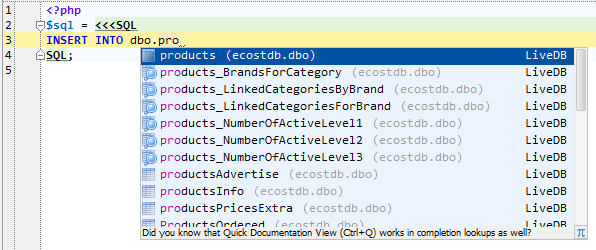
My suggestion: try it in a brand new empty project and try simplest command possible -- maybe you need to refresh schema data in current one (in case if you inherited this from previous version).
If you are using MySQL -- see if quoting column names (surrounding with ` backtick character) will make any difference.
Hi Andriy,
you put me to shame, sorry for my gruntly initial responses yesterday.
But, alas, no, I tried all this to no avail. SQL dialect is set to mysql throughout, ctrl-space only gives me function names or mysql constants.
It's a bit weird because following your example
"INSERT INTO <crtrl-space>
Suggests "ADD" and other things. Not even table names. It does though resolve tables then correctly as it tells me if a table can't be found. But it won't autocomplete me on tables nor fields (also not if they are `'ed)
I'm trying more but I feel that it just perhaps is not supposed to work the way I think.
Cheers,
Tom
Andriy,
I tried all and verified all settings and verified I'm doing things correctly and I do.
I get
* No autocomplete besides mysql function names
* Invalid table names will get marked correctly as unknown
* Columns are all marked as unknown
Cheers,
Tom
Well .. don't know what you are possibly doing wrong (or maybe there is a bug in IDE). Here is what I have done just now .. and it works
1) Created new simple DB with 1 table (just for testing)
DB name: abcd
Table SQL:
2) Created separate user and password for it; granted access to that DB
3) Created brand new project in PhpStorm. Set SQL Dialect to MySQL in "Settings | SQL Dialects"
4) In PhpStorm -- created new DB Connection using "MySQL Connector / J-5.1.22" driver
5) Told it what schemas to scan
6) Made sure that it found all the tables (only 1 anyway)
7) Start working:
I have attached my test project here -- edit DB connection details so it connects to your sample DB (preferrably add 1-2 more tables to your one .. or add/rename fields, to make sure that IDE fetched your details) and see if it will work for you. If nothing -- check the idea.log file for possible hints (Help | Show Log in ...)
Attachment(s):
mysql.7z.zip
http://youtrack.jetbrains.com/issue/IDEA-107341 ?
Hi,
thanks for the reply.
My problem is different. Besides, it has changed now.
I now do get bold (=known) column names and tables names but no autocomplete still but in the console I do get autocomplete. Don't know what caused all this, but perhaps me removing the database and readding it solved something.
So now seemingly the only missing thing is autocomplete of anything related mysql in the code editor (as while in the mysql console edtior I do get autocomplete)
I've tried normal statements as I write them in the code, as well as
<<<SQL
BLAH
SQL;
which also doesn't work and yes it's all set to "mysql".
It'll be a major speedup to have autocomplete working for sql queries in the code editor and hopefully somehow this can be done.
Cheers,
Tom
PS: btw what is this <<<SQL thing, it would make my code completely unreadable if I had to use it...
Standard HEREDOC syntax? http://www.php.net/manual/en/language.types.string.php#language.types.string.syntax.heredoc
In this particular case SQL language is automatically injected there because of "SQL" identifier (e.g. for JavaScript injection you can use "JS", "CSS" for CSS etc) -- see "Settings | Language Injections" for details.
It's not necessary to use it -- IDE should recognize sql syntax even in normal strings, just in this case it is guaranteed to have proper language injection (will work even if you use rare/non-standard sql command, like EXEC for example).
Please attach log files (Help/Show Log).
They may contain some exception stacktraces we can base our investigation on.