Cant get xdebug working

I am using PhpStorm for development in Windows 7. I am trying to setup xdebug.
I installed xdebug to server by using pecl.
I added these codes to php.ini
zend_extension="/usr/local/lib/php/extensions/no-debug-non-zts-20100525/xdebug.

xdebug.remote_enable=1
xdebug.remote_host=212.2XX.179.83
xdebug.remote_port=9001
xdebug.idekey="PHPSTORM"
xdebug.remote_log=/tmp/xdebug.log
phpinfo() shows Xdebug running.
when i use;
netstat -aon | more
on cmd I can see that its listining in port 9001
TCP 0.0.0.0:9001 0.0.0.0:0 LISTENING 4908
But Xdebug can not connect to PhpStorm
xdebug.log shows that it can not connect to my ip:port
Log opened at 2013-05-02 17:20:55
I: Connecting to configured address/port: 212.2XX.179.83:9001.
E: Could not connect to client. :-(
Log closed at 2013-05-02 17:20:58

Log opened at 2013-05-02 17:20:58
I: Connecting to configured address/port: 212.2XX.179.83:9001.
E: Could not connect to client. :-(
Log closed at 2013-05-02 17:21:16

Log opened at 2013-05-02 17:21:16
I: Connecting to configured address/port: 212.2XX.179.83:9001.
E: Could not connect to client. :-(
Log closed at 2013-05-02 17:21:19
I runned;
nc -v 212.2XX.179.83 9001
on the server and it answers
nc: connect to 212.2XX.179.83 port 9001 (tcp) failed: Connection timed out
I am working on this for 3 days and can not find a solution.
Any help about debugging why server can not connect to ip would be great. Thanks
请先登录再写评论。
Hi there,
Please show the screenshot with the port forwarding settings of your router as well as "Settings | PHP | Debug" from PhpStorm.
edited
As far as I'm aware the port forwarding on router is NOT configured properly.
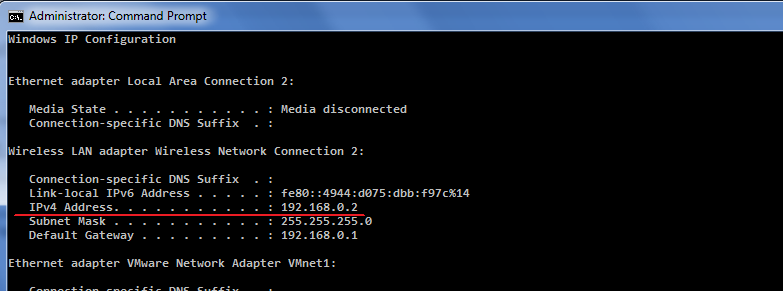
I still have no idea why you keep using your EXTERNAL IP when page clearly says (on the top .. and then again in the middle) that you have to enter your LOCAL / LAN IP address (192.168.2.xxx) -- at the end of the day that's where all incoming connections on that/those ports will be forwarded to -- to your computer behind the router.
Just find out LAN IP address of your computer and use it there (see output of ipconfig). For example:
Let me know about outcome.
edited
If CanYouSeeMe and alike can see you on that port ... but xdebug still does not work .. then I only have these ideas/checklist:
(old one) on another -- 151.XXX.235.47 --- which one is correct now?1) Make sure that IP address you use is up to date / correct (CanYouSeeMecan use your current IP from browser while manually provided IP on your server may be out of date)
In one place you were using
2) Make sure that PhpStorm listens for debug connection at that time ("Run | Start Listen PHP Debug Connection" should be enabled -- the easiest way). I always recommend this article: http://confluence.jetbrains.com/display/PhpStorm/Zero-configuration+Web+Application+Debugging+with+Xdebug+and+PhpStorm
3) I never worked with nc -- always used telnet for such purpose. But I guess they both do the same thing in this particular regard.
I have tried telnet to your IP (I believe it is yours) and it seems to connect fine (running from Windows):
I do see the same response when I attempt to connect to locally running PhpStorm when it listens for connection.
Configuring my PHP to connect to your IP:
Based on this I assume that it does work fine from xdebug side -- possibly what is left is some configuration from PhpStorm side somewhere. I may only refer to the same article again and suggest testing this on very basic and simple script (few very simple lines; one command per line) until you make it work -- after that you can move to real project. Something like this:
4) Make sure that you have breakpoints set on reachable statements (on some lines xdebug simply cannot break, for example: http://devnet.jetbrains.com/thread/443996 ). Alternatively use xdebug_break(); to force break from the code.
edited