PyCharm 2016.2 shows reserved words as unresolved references

I have just installed 2016.2 over my previous 2016.1.4 professional and I see that pycharm is highlighting all Python reserved words as unresolved references. I can work just fine but it is really distracting
Find attached an example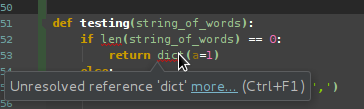
Any suggestions how to fix it?
TIA
请先登录再写评论。
I am using the community version and have the same problem as Mariano.
We have a bug related to having the same virtualenv defined twice in your IDE. Take a look at your list of all virtualenvs (Project Interpreter -> Click on gear -> Manage) and see if you have any interpreters with (1). Also, in the Project Tool window, see if External Libraries is empty.
If so, you'll have to find jdk.table.xml in your preferences directory on disk and manually delete the duplicate.
We thought we had eradicated this issue, but it popped up again for me just before EuroPython.
Thanks so much for your comments, Paul.
Guess I will have to wait for a patch to fix this in the immediate future, no worries.
TIA,
Mariano
The duplicates for jdk.table.xml is inside the one file, not multiple files. Meaning, look for <jdk> entries in there that point to the same interpreter.