Webstorm and ES6: How to ?

Hallo,
i'm new to javascript and webstorm IDE.
I have a problem to get es6 running with ws.
I used this how to: http://mcculloughwebservices.com/2015/12/10/webstorm-babel-6-plugin/

test.js

my-module.js
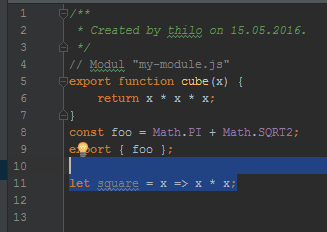
If i run test.js i get:
"C:\Program Files (x86)\JetBrains\WebStorm 2016.1.1\bin\runnerw.exe" "C:\Program Files\nodejs\node.exe" test.js
d:\javascript\es6\src\test.js:5
import { cube, foo } from 'my-module';
^^^^^^
SyntaxError: Unexpected reserved word
at exports.runInThisContext (vm.js:53:16)
at Module._compile (module.js:373:25)
at Object.Module._extensions..js (module.js:416:10)
at Module.load (module.js:343:32)
at Function.Module._load (module.js:300:12)
at Function.Module.runMain (module.js:441:10)
at startup (node.js:139:18)
at node.js:968:3
test.js.map
{"version":3,"sources":["../src/test.js"],"names":[],"mappings":";;AAIA;;AACA,QAAQ,GAAR,CAAY,oBAAK,CAAL,CAAZ,E;;;;;AACA,QAAQ,GAAR,gB;;AAEA,QAAQ,GAAR,gB;AACA,QAAQ,GAAR,gB;;AAGA,IAAI,SAAS,SAAT,MAAS;AAAA,SAAK,IAAI,CAAT;AAAA,CAAb","file":"test.js","sourcesContent":["/**\r\n * Created by thilo on 15.05.2016.\r\n */\r\n\r\nimport { cube, foo } from 'my-module';\r\nconsole.log(cube(3)); // 27\r\nconsole.log(foo); // 4.55580621596288\r\n\r\nconsole.log(foo); // 4.5558062159628555\r\nconsole.log(foo); // 4.5558062159628555\r\n\r\n\r\nlet square = x => x * x;"]}
my-module.js.map
{"version":3,"sources":["../src/my-module.js"],"names":[],"mappings":";;;;;QAIgB,I,GAAA,I;;;;;AAAT,SAAS,IAAT,CAAc,CAAd,EAAiB;AACpB,SAAO,IAAI,CAAJ,GAAQ,CAAf;AACH;AACD,IAAM,MAAM,KAAK,EAAL,GAAU,KAAK,KAA3B;QACS,G,GAAA,G;;;AAET,IAAI,SAAS,SAAT,MAAS;AAAA,SAAK,IAAI,CAAT;AAAA,CAAb","file":"my-module.js","sourcesContent":["/**\r\n * Created by thilo on 15.05.2016.\r\n */\r\n// Modul \"my-module.js\"\r\nexport function cube(x) {\r\n return x * x * x;\r\n}\r\nconst foo = Math.PI + Math.SQRT2;\r\nexport { foo };\r\n\r\nlet square = x => x * x;\r\n\r\n"]}
fileWatchter:

Okay how can i run the test.js without an error?
What are the *.map files for?
Thank you for any help.
请先登录再写评论。
The test.js in /dist folder looks like this:
and the my-module.js is:
running this test.js i get this error:
"C:\Program Files (x86)\JetBrains\WebStorm 2016.1.1\bin\runnerw.exe" "C:\Program Files\nodejs\node.exe" test.js
module.js:327
throw err;
^
Error: Cannot find module 'my-module'
at Function.Module._resolveFilename (module.js:325:15)
at Function.Module._load (module.js:276:25)
at Module.require (module.js:353:17)
at require (internal/module.js:12:17)
at Object.<anonymous> (d:\javascript\es6\dist\test.js:3:17)
at Module._compile (module.js:409:26)
at Object.Module._extensions..js (module.js:416:10)
at Module.load (module.js:343:32)
at Function.Module._load (module.js:300:12)
at Function.Module.runMain (module.js:441:10)
1. your first error occurs because you run original ES6 code (d:\javascript\es6\src\test.js) instead of the transpiled one (d:\javascript\es6\dist\test.js)
2. your next error is caused by the way you import your module. Try changing 'from 'my-module'' to 'from './my-module''
check out my stream here: https://www.livecoding.tv/dschinkel/videos/bLdyk-tdd-an-es6-promise-library-6
Thank you very much. That was easy. ;-)
@Dave
I will check the stream on the weekend.