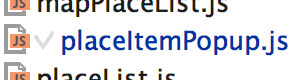
This "V" icon most likely means that you have bookmarked the whole file (yes, you can do such things). Just bring the Manage Bookmarks window and remove it from there .. or just invoke "Edit | Toggle Bookmark" action again while having that file focused in Project View.

Hi there,
This "V" icon most likely means that you have bookmarked the whole file (yes, you can do such things). Just bring the Manage Bookmarks window and remove it from there .. or just invoke "Edit | Toggle Bookmark" action again while having that file focused in Project View.
You're right, thanks!
For the crew: it would be better to describe similar icons here - https://www.jetbrains.com/help/phpstorm/2016.1/icons-reference.html