Bottom bar tags missing (run, console...)
已回答

I am missing the bottom tags where you usually have "Run", "Console", "Application Server", "VCS", etc... Look at this image, the place where those button usually are is where it says "compilation completed successfully". How can I have them back?
请先登录再写评论。
Click here:
https://www.jetbrains.com/help/idea/2016.1/manipulating-the-tool-windows.html#show_all
Thank you Serge!
Thank you, Serge! 👍
7 years later and here we are, still! This is a bad UX design; it's so close to the edge which you usually use to resize the window. 🥲
Also, Window → Layouts → Restore Current Layout (Shift + F12) seems not to restore these panels. At least in 2023.2.3. I think it probably should restore it, but not completely sure. :D
Paul Maminov if you're talking about Run and Debug not being restored after you saved the layout with those windows opened, then they are tied to certain context and cannot be created independently, even being a part of the saved layout. Hopefully we'll come up with a solution at least for some dynamic tool windows.
There's an issue for this in our tracker, please upvote IDEA-326075 and follow it for updates, see this article if you are not familiar with YouTrack.
If I misunderstood your scenario, please describe it in more details. Thank you!
Ekaterina Valeeva , thanks!

No, I'm talking more about “Git”, “Find”, “TODO”, “Terminal” and other tabs near “Run” and “Debug". Though they can be linked to the context, too. Not all projects are linked to Git, but I thik majority have something to Find in them. :D
But the issue you've linked seems to be pretty much the thing I want, so I've voted for it. Thanks once again. :)
---
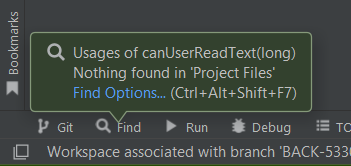

P.S. When I use `Alt + F7` to look up usages of a method that isn't used anywhere, it shows a tooltip above the `Find` tab.
But after I click the botton-left button (it has changed compared to the previous screenshot), tooltip appears in the middle of the bottom bar, as it cannot find the `Find` tab.
I don't think this post-scriptum is worth of a creating an issue, but it still serves as an illustration to the inital topic.
Paul Maminov the behaviour you described in P.S. is expected: if the corresponding tool window button is not available, but tooltip notifications are enabled for that window, the tooltip will be shown near the sidebar where the hidden window was supposed to be.