I believe you're referring to the Services section, where you have your files listed as part of the sessions it's attached to. If so, then it should not show the full path of the file as the file name. To investigate this, please specify your database, DataGrip version, and OS version.
I don't quite understand what you mean by "service". This should be the right file ,As shown in the picture, if my query file is in the root directory of the PROD database control library, it does show only the file name, such as 1-17, but if it is in the file package I created, the file name displayed is the full path. When I try to change the file name, it does show "更改主体". I think it has nothing to do with the database. I have also created it in MySQL database, and the same situation
DataGrip Version:DataGrip 2024.2.1 database:TIDB OS version : Window10

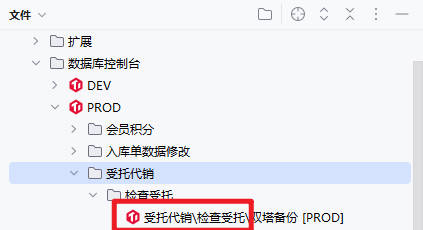
I believe you're referring to the Services section, where you have your files listed as part of the sessions it's attached to. If so, then it should not show the full path of the file as the file name. To investigate this, please specify your database, DataGrip version, and OS version.
I don't quite understand what you mean by "service". This should be the right file ,As shown in the picture, if my query file is in the root directory of the PROD database control library, it does show only the file name, such as 1-17, but if it is in the file package I created, the file name displayed is the full path. When I try to change the file name, it does show "更改主体".
I think it has nothing to do with the database. I have also created it in MySQL database, and the same situation
DataGrip Version:DataGrip 2024.2.1
database:TIDB
OS version : Window10
Thanks for the update.
This could have been a regression:
https://youtrack.jetbrains.com/issue/DBE-8092/Database-Console-Editor-Tab-Filename-Includes-Path
Please check first if you have these 2 Show options set
Then check your current values in
```
idea.config.path=s:/My Drive/DataGrip/
idea.plugins.path=s:/My Drive/DataGrip/plugins
```
Please check the thread in this issue and see if the suggestions work
Above is my setup.
I think it's different from what you said about regression
As shown in the figure above, my desired result is to display “代理商批量上线员工脚本[PROD]” , Rather than “员工档案\代理商批量上线员工脚本[PROD]”.
We have reported this issue on our tracker:
https://youtrack.jetbrains.com/issue/DBE-22111/Query-console-file-names-are-shown-as-their-full-path-file-name
Please follow this issue to stay updated on the progress.