Show all compilation errors expanded

Hi all,
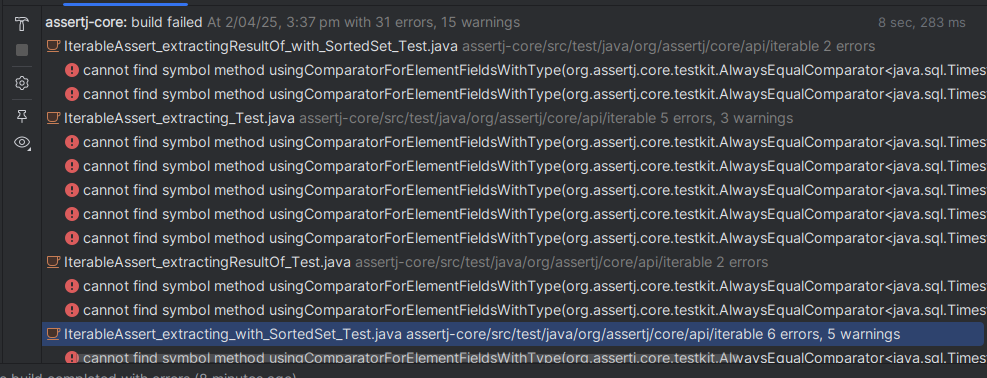
Is there a way to get Idea to show all compilation errors without having to double-click on each file having compilation errors.
My use case is: delete a deprecated method or a class and fix all compilation errors, the current Idea behavior makes it a bit painful to quickly navigate to all errors
Example of the current behavior

Example of the desired behavior
Possible solutions
- an Expand All button
- a shortcut to navigate to the next error (the shortcut for Next Highlighted Error does not work in the build view)
Thanks in advance for your lights
Joel Costigliola
PS: the version I'm using is
IntelliJ IDEA 2024.3.5 (Ultimate Edition)
Build #IU-243.26053.27, built on March 16, 2025
Licensed to AssertJ / Joel Costigliola
Runtime version: 21.0.6+8-b631.39 amd64 (JCEF 122.1.9)
VM: OpenJDK 64-Bit Server VM by JetBrains s.r.o.
Toolkit: sun.awt.X11.XToolkit
Linux 5.4.0-212-generic
Linux Mint 20.3; glibc: 2.31
Kotlin plugin: K2 mode
GC: G1 Young Generation, G1 Concurrent GC, G1 Old Generation
Memory: 3074M
Cores: 6
Registry:
ide.experimental.ui=true
Non-Bundled Plugins:
com.jetbrains.space (243.25659.54)
com.intellij.ml.llm (243.23654.270.16)
Kotlin: 243.26053.27-IJ
Current Desktop: X-Cinnamon
请先登录再写评论。
Hi Joel. You can try the below workarounds:
Ctrl+ =andCtrl+Shift+ =) when the focus is on the topmost item in the Build Output treeCtrl+Alt+Down,Ctrl+Alt+Up)