No 'Show Quick Fix ' Option in Rider ' ToolTip like it has on Webstorm or IntelliJ
已回答

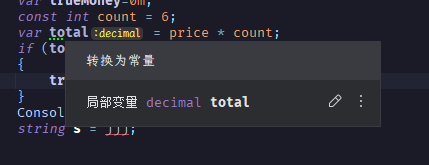
Sorry I cant find topic of Rider. When for instance, in the code there's a warning that WebStorm has underlined, I can hover on the word and a tooltip appears with the warning message and an Quick fix and 'more actions' links at the bottom also mentioning there keyboard shortcut. There is also a three dot icon on right corner that when clicked shows two options ,[Show Quick Fixes],[Show Inspection Description]. But I cant see these a little advanced feature in Rider. Is it that Rider doesnt have the feature or is it disabled somewhere?
请先登录再写评论。
Hello,
Make sure the following options are enabled in the settings:
If they are, see if it helps to:
Sorry,it's Rider not idea,I want find the bulb in rider ,My idea have the feature,but Rider not have.
General settings are pretty much the same in all IntelliJ-based IDEs. So you should be able to find these in Rider too.