Can I get IntelliJ to stop selecting text when I put my cursor next to that text?
已回答

Windows 11
IntelliJ 2025.1.3 Ultimate Edition
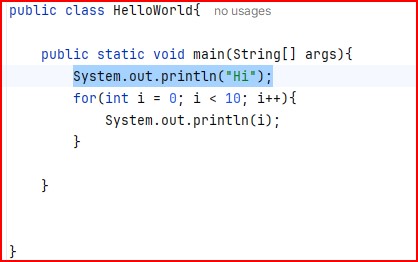
In the screen shot below I put my cursor next to (right) semicolon. IntelliJ selected the line for me.
I don't want this for various reasons.
Is there a way to turn it off?
请先登录再写评论。
Hi, Russel!
Do you have any settings at an OS level that could potentially be enabled on this?
Another option you could try here is to check if resetting your IDE settings helps. To do that, go to File | Manage IDE Settings | Restore Default Settings.
I wouldn't know of such a setting.
It also happens sometimes with MS Visual Code.
It does not happen with older editors like Notepad++, or Visual SlickEdit.
Hi, Russel!
Can you confirm if resetting the settings through the path I mentioned worked?
Could you check if you installed some input method tools or mouse macros? This not sounds like an IDE issue as it also happens to the Microsoft tools.
One feature similar to your issue is the Edit | Extend Selection feature, triggered by Ctrl+W.
You may try to asking support from Microsoft too.
Hey all,
The first name is Steve.
File | Manage IDE Settings | Restore Default Settings.
Did not help
I'm not sure I know what input method tools or mouse macros are so I am pretty sure I didn't install any. :-)
Please tell us what brand of mouse you are using. Please attach the logs via the menu Help > Collect logs and Diagnostic Data if possible.
Inland Mouse
Model: RTM098(J10)
Can you temporarily use another brand of mouse to see if the issue persists? It will help us determine whether the issue is an IDE problem or a hardware issue.
I bought a new mouse and have not seen the problem since.