Just for learning and testing purpose. First I create normally a javafx project with java and gradle with no additional libraries.
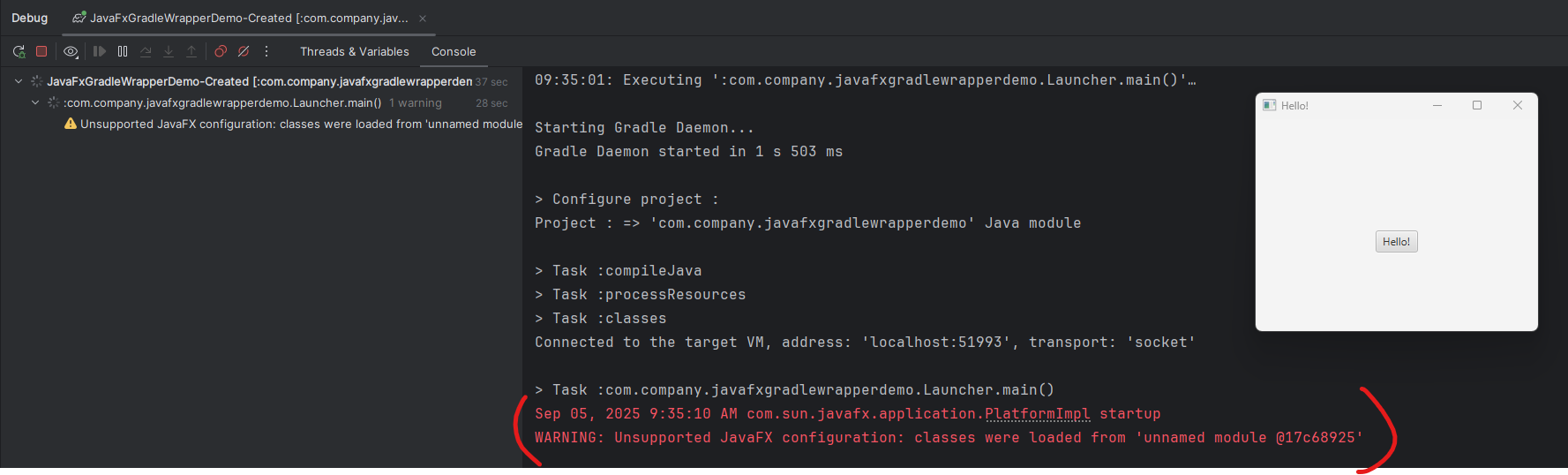
After creation of JavaFx, IntellJ normally created three classes, HelloApplication, HelloController and Launcher, there are also hello-view.fxml. First I run the project, open up Launcher class and debug or run it with following configuration and a little issue, why is there warning?
I want just to have only one class MainApp, so renamed HelloApplication to MainApp, delete hello-view.fxml, HelloController and Launcher classes, modify also build script from HelloApplication to MainApp. But i have issue with running or debugging.
@Override public void start(Stage stage) { Label label = new Label("Hello JavaFX 👋 (Gradle Wrapper, minimal)"); Button button = new Button("Click me"); button.setOnAction(e -> label.setText("Clicked!"));
VBox root = new VBox(10, label, button); Scene scene = new Scene(root, 320, 200);
stage.setTitle("JavaFX Minimal with Wrapper"); stage.setScene(scene); stage.show(); }
public static void main(String[] args) { launch(args); } }
content of build.gradle.kts
plugins { java application id("org.javamodularity.moduleplugin") version "1.8.15" id("org.openjfx.javafxplugin") version "0.0.13" id("org.beryx.jlink") version "2.25.0" }
Your `MainApp.java` code is correct. The problem isn't in your code, but in how the application is being launched from within IntelliJ. The error "JavaFX runtime components are missing" appears because the standard “run” button (the green arrow) doesn't tell the JVM where to find the JavaFX modules.
The correct and easiest way to run your project is to use the built-in Gradle “run” task, which is already configured to do this for you.
Here’s how:
In IntelliJ, open the Gradle tool window on the right side.
thanks you for your help. I also get it work, with Gradle Tool run. Just for understanding. If I do not delete Launcher class, the standard “run” button (the green arrow), also work without click on "run" task in Gradle tool windows.
But why is it so, that without Launcher class, standard run button does not work any more?
You need the Launcher class to use the simple 'Run' button because it acts as a clever workaround to a strict check that JavaFX performs.
Here’s the process:
The Problem: When your main class (like MainApp) extends javafx.application.Application, JavaFX requires special module information to start. The simple 'Run' arrow in the IDE does not provide this, so it fails.
How the Launcher Solves It: The Launcher is a plain Java class that does not extend Application.
When you click 'Run' on the Launcher, JavaFX sees this plain class and skips its strict module check.
Once the Launcher is running, its only job is to start your realMainApp class. The check has already been bypassed, so your application loads successfully.
Think of the Launcher as a helper whose only purpose is to start your main application in a way that is compatible with the IDE's simple 'Run' button.





Hi Yong,
Your `MainApp.java` code is correct. The problem isn't in your code, but in how the application is being launched from within IntelliJ. The error "JavaFX runtime components are missing" appears because the standard “run” button (the green arrow) doesn't tell the JVM where to find the JavaFX modules.
The correct and easiest way to run your project is to use the built-in Gradle “run” task, which is already configured to do this for you.
Here’s how:
This should launch your application successfully.
Hope this helps!
Hello Aram,
thanks you for your help. I also get it work, with Gradle Tool run. Just for understanding. If I do not delete Launcher class, the standard “run” button (the green arrow), also work without click on "run" task in Gradle tool windows.
But why is it so, that without Launcher class, standard run button does not work any more?
Hi Yong,
You need the
Launcherclass to use the simple 'Run' button because it acts as a clever workaround to a strict check that JavaFX performs.Here’s the process:
MainApp) extendsjavafx.application.Application, JavaFX requires special module information to start. The simple 'Run' arrow in the IDE does not provide this, so it fails.LauncherSolves It: TheLauncheris a plain Java class that does not extendApplication.Launcher, JavaFX sees this plain class and skips its strict module check.Launcheris running, its only job is to start your realMainAppclass. The check has already been bypassed, so your application loads successfully.Think of the
Launcheras a helper whose only purpose is to start your main application in a way that is compatible with the IDE's simple 'Run' button.Hope that clarifies it!