Terminal History pop-up is gone

In 2024.3 in “New Terminal” you could type part of command and by clicking up you'd get a list of commands you did before that included currently typed line
Also just pressing arrow up would show same pop-up with visible history, instead of scrolling lines 1 by 1.
Now the history window is gone.
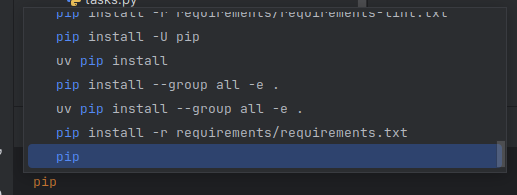
In 2025 version the “New Terminal” is gone and deprecated ( https://www.jetbrains.com/help/pycharm/2024.3/terminal-emulator.html#configure-the-terminal-emulator )
And instead of it we get “Terminal 2025” which “designed to combine the stability of the Classic emulator with improved performance, compatibility, and modern enhancements” and yet this feature was removed :(
Is it gone or am I just missing a way to enable it? Nothing in settings.
请先登录再写评论。
Hi! Indeed, there is no popup history in the reworked terminal, sadly. We have a feature request for that, please upvote IJPL-194936 and follow it for updates (see this article if you are not familiar with YouTrack).
Hey, any updates on getting this feature back?
I don't know why the pop-up menu for the command history in the terminal disappeared after the update from 2025 to 2026!!!!!!! I've now switched to “Experimental 2024 (deprecated)” to get the menu back. I have no idea why PyCharm removed this great usefull pop-up menu….
The popup-based command history was a feature of the previous "New Terminal Beta" engine. The Reworked Terminal (default since 2025) does not yet implement that popup; it relies on the shell's native history instead (Up arrow, Ctrl+R).
This is tracked as a Feature request: [IJPL-194936](https://youtrack.jetbrains.com/issue/IJPL-194936). Please vote and star it to add your signal.
The workaround you already applied (switching Terminal Engine to "Experimental 2024 (deprecated)" in **Settings | Tools | Terminal**) is the documented one. The trade-off is that the older engine no longer receives active development.
Best regards,