The "Replace var with inferred type" folding option does not always replace the var keyword

I am wondering, what is the actual logic of the mentioned option. I mean, when and why does/doesn't it replace the var keyword with the actual inferred type? Bellow are screenshots of few examples. I don't understand why it does not replace the var keyword always, but only sometimes.

and just two lines bellow I have

And another line
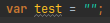
I could understand the last one, it's obvious it is a string. But what about the first example? I even had several let's call it “builder like” expressions, where the var wasn't replaced.
I have also noticed, that once I clicked on the replaced type (e.g. in the second example I clicked on the “String”) then it changed in editor to “var” and I don't see any way how to make it display the inferred type again.
Could you please explain to me when the var is replaced and when not? Is there some option which I can enable, which would cause that it is always replaced? Or at least some keyboard shortcut?
Btw. I know I could use Inlay Hints for similar purpose, but for me personally they are not visually appealing and are distracting me.
请先登录再写评论。
I found there is the “toggle folding” action, which I can assign shortcut to and which allows me to again “replace” the var with inferred type on places, where I clicked on them.
But it does not work everywhere. Some cases like mentioned “builder like” expression, or even simple assignment like this
var c = new ResourceAttributeDefinitionType();does not “fold” to the inferred type even when I execute the “toggle folding” action. In those cases it instead folds whole method in which the code is present.That is misunderstanding. I don't want to replace the var for explicit type in the source code. I just want to see it in the “presentation” layer. I want the source code to still have “var”.
Maybe the misunderstanding came from the word “replace”. I am using that word just because it is in the name of the option itself. Maybe I should just say “fold” even though that does not makes much sense to me either.
Here is a scratch example.
Navigate to the line with
var a = test();and try to “fold” it with toggle folding action. At least in my case, it does fold whole main method. When you will navigate to thevar b = “”and do the same there, it will “fold” the “var” to the actual inferred type (String).By the way, It seems that the length of the name of the class is the culprit. When I shorten it to just “SomeClass”, then the “folding” works fine.
So maybe I should ask, is the class name length for which the "folding" can be applied hard-coded? Or can I configure it somehow?
Please follow the issue and comment on it to discuss it further.
How to follow the receive notifications from a Youtrack issue: https://intellij-support.jetbrains.com/hc/en-us/articles/207241135-How-to-follow-YouTrack-issues-and-receive-notifications