chrome-profiles folder takes too much disk space(over 20GB)

platform: windows 11
webstorm version: 2025.2
Problem: appData/local/jetBrains/webstorm2025.2/chrome-profiles takes too large disk space
I am not sure my using behavior is related, anyway I used to debug 3-4 git branches via projects at sametime and 15 branches ish over all, switch between them very frequently.
here is the analysis data table by WizTree
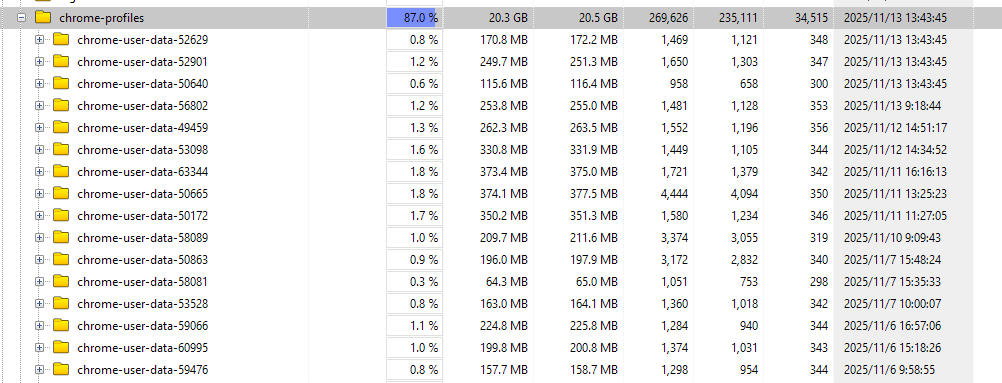
I am wondering will webstorm create one more folder by what machenism?
and could I change the dest folder to another disk? or can I just delete the older ones?
请先登录再写评论。
These are temporary Chrome user data dirs created when debugging in Chrome. The IDE needs to pass the
--remote-debugging-portoption to Chrome in order to attach a debugger; Chrome is started with a new fresh profile to ensure that no instances with the same user data are running so that the debug flag can be passed.You can delete these folders and then set up Chrome to run with your user data:
Ctrl+Alt+Sto open settings and then select Tools | Web Browsers and Preview.Please note that if you do this, you would need to make sure that no instances that use this data are open when you start the debugger.
That clears things up about Chrome debug profiles in WebStorm. Cleaning them and setting a custom directory is a good fix. After long debugging sessions, I usually reset my brain with something light like Stickman Hook.