Hi Heart6eats, what you’re seeing is the parameter tooltip that appears while typing a function call. Please try the following options for PyCharm to disable it:
- File | Settings | Editor | Code Editing > uncheck Show quick documentation on hover
- File | Settings | Editor | General | Code Completion > uncheck Show the parameter info popup in ... ms or set delay very high

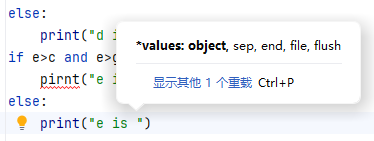
Hi Heart6eats, what you’re seeing is the parameter tooltip that appears while typing a function call. Please try the following options for PyCharm to disable it:
- File | Settings | Editor | Code Editing > uncheck
Show quick documentation on hover- File | Settings | Editor | General | Code Completion > uncheck
Show the parameter info popup in ... msor set delay very high