Publishing artifacts to Jboss/Wildfly
已回答

Hello
I am pretty sure that some time ago in this screen
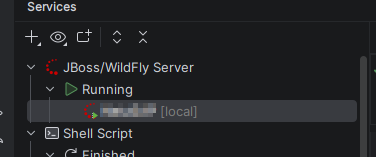
as soon as an artifact was deployed to the server the server (obfuscated here) could be expanded and thus it was possible to “Publish” any of the deployed artifacts.
Am I wrong here?
Because it seems for me the possibility to expand the server here is gone for whatever reason. So I can no longer trigger a “publish”.
The artifact is deployed. The server is starting and the app is working. I just don't see the possibility to do publish on deployed artifacts.
Any hints here are highly appreciated.
Thx.
Rob
请先登录再写评论。
Hello Rob
Your current Services view looks as expected; nothing is “missing”. IntelliJ IDEA doesn’t expose a per‑artifact Publish node there; maybe you remember another IDE like Eclipse JBoss Tools that has a Publish per module. In IntelliJ IDEA to Publish artifacts (JBoss/WildFly Server) you have to:
I have the same behavior as Rob and do not see a way to undeploy artifact from running JBoss.
Well. Thank you @.... I think it was my mistake then.
Aleksander Kostowski Undeploying artifacts should be possible with the context menu on the Jboss, by simply choosing “Artifacts” and in the next Screen move the artifacts you wan't to have deployed or undeployed.
I am deploying applications using the Artifacts window in IntelliJ IDEA. However, when I move an artifact back to the left panel (removing it from deployment), it is not undeployed from JBoss and remains deployed even after restarting JBoss.
I am also pretty sure that there was a button near server name that could be expanded to show all deployed artifacts.
Hello Rob and Aleksander Kostowski
I reviewed again in our database and found that before 2025.3 in the Services Tool Window, the artifact nodes were listed under server run configuration nodes and also shown in the split view on the right. So later IDE versions show the artifacts only in the right view, but they still work the same way with the Deploy and Undeploy buttons.
At the moment, Deploy works as a Redeploy action. There's an open ticket to change the Deploy tag to Redeploy when the artifact has already been deployed.
Aleksander Kostowski, the Artifacts window only defines and builds artifacts; it does not send deploy or undeploy commands to JBoss/WildFly. To actually undeploy, you must use the JBoss/WildFly run configuration:
Select the artifact and click “-” (Remove) to take it out of the server’s deployment list.
Hello @...
Oh, so there was a change actually?
I think Eclipse had the possibility, but it has been quite some time since I last used it.
With this information I now installed IDEA 2025.2.6.1
Et voila, there is what I was looking for
You even had the possibility to Redeploy there.
Why has this been removed? If I could vote for I would like to have it back the way it was pre 2025.3. I find it more practical to have the artifact nodes visible under the server than use the split window.
For me this change is not so positive!
Furthermore I have the feeling that running/debugging JBoss pre 2025.3 was a lot faster than it is in current IDE. I need to check this out further. This is also something that bothered me with the most recent versions of the IDE.
I did a simple measurement now; I started current IDE did a gradle cleanup on the project and then started Jboss RUN; The whole time with gradle build until server boot/deployment was done was around 1 min, 40 seconds.
I closed IDE and started 2025.2 IDE, and after gradle cleanup started Server RUN; The time was about 1 min.
What I notice here additionally is that the time after gradle build is done and until the first logs of the server start appear in the console is sometimes extremely long in current IDE versions.
This is especially the case after code changes have been made. Starting the server afterwards let's gradle builds run and then although the STOP Server button is active already nothing happens for quite some time (1-2 minutes at least) until the first startup logs appear and the server start happens.
Hello @...
Thank you for clarifying. I think that before version 2025.3, if I added an artifact in the Artifact window, I was able to deploy it using the right mouse button on the artifact node. That allowed me to start JBoss without any artifacts deployed and then deploy an artifact without restarting the server. Now the only way to deploy an artifact is to restart JBoss. I am a little confused about why that was changed, and in my opinion, it is now more confusing.
Kind regards,
Aleksander Kostowski
Hello Rob
Thanks a lot for re‑checking with 2025.2 and for sharing your measurements.
To answer your question, the node with artifacts was removed from the Services view to improve code maintenance and remove redundant views; that's why the side list remains available. However, your feedback (preferring the old artifact list and quick Redeploy) has already been shared with the team and linked to the related issues IJPL-218977 and IDEA-383576, which focus on restoring convenient actions in the new UI. I’d recommend subscribing to and upvoting those tickets so your use case is visible.
Regarding performance: your comparison (~1:40 in current vs ~1:00 in 2025.2 for the same Gradle clean + JBoss run) and the long gap after Gradle finishes but before the first server logs appear is very useful. If you’re open to it, the best next step is to collect IDE logs and a CPU snapshot while that delay happens, so we can investigate further and determine corresponding actions. So you can create a new ticket, or you can attach the zip file via our secure upload site https://uploads.jetbrains.com/, sharing the uploadID, and I'll create the ticket from there.
Hi Aleksander Kostowski
The change was driven by the need to improve maintenance and to keep the actions in a single view. However, I already shared your feedback with our team and also linked your post to the tickets.
Thanks for sharing your thoughts on this!