Change language in inspection popup menu

Hello you all,
I'm using the great PhpStorm 2017.3.3 on a french version of Windows 7.
When PhpStorm inspects the JavaScript code and finds that it may be improved, the well-known little light bulb icon appears. If I click on the icon, a popup menu appears. It contains some actions. Some are written in english, which is fine, but some are written in french, which is annoying :
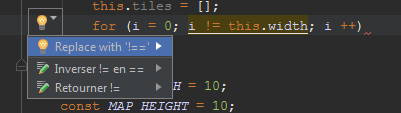
I could not find a way to have the actions always displayed in english. May somebody help ?
请先登录再写评论。
Are you using any localization plugins or have modified IDE files?
@Dmitry. Hi. This is the default installation. After reviewing the descriptions of the plugins in the Settings / Plugins list, I did not notice something related to the localization. I did not modify IDE files.
Hi!
Are there any 3rd-party plugins related to JavaScript?
@Vladimir. The only plug-ins related to JavaScript seem to be (I look for plug-ins with "javascript" in the name) :
JavaSript Debugger
JavaScript Intention PowerPack
JavaScript Support
Denis, please collect and upload the IDE log somewhere, hopefully it'll shed some light.
Also, please attach a code sample so we could take a look at those ourselves. Thank you!
@Eugene. A test file and the idea.log are available there :
http://www.stashofcode.fr/code/phpstorm/idea.log
http://www.stashofcode.fr/code/phpstorm/test.js
Here is what I got using this test file :
That is extremely strange. We don't provide any UI translations, and there's no way this is coming from PhpStorm itself.
Do you have any software installed that possibly could somehow translate the UI automatically?
Just for a test, please create a new user in your system, log on with it and check if it's the same there.
Hi Denis,
Please open Help > Edit Custom VM Options and add there
line, then save the file and restart PhpStorm - it will fix the issue.
@Eugene. I will test, but I don't see what software it may be. Or do you rely of the JavaScript engine of Firefox or another browser to create the options in the light bubble menu ? My Firefox is in french, as is my Windows 7. Also, a JRE (8.0_71) and a JDK (1.8.0_66) are installed.
@All. Vladimir nailed it. This line had to be added to the VM Options file. Thanks you all!
IDE contains the french resource for JSIntentionPowerPack plug-in since it's the native language of the original plug-in developer: https://plugins.jetbrains.com/plugin/264-jsintentionpowerpack. When this plug-in was moved into IDE codebase back in 2006, _fr resource remained for some reason. The workaround with -Duser.language=en suggested above will fix the problem.