IntelliJ icon are always displayed in the taskbar
已回答

When I build the project, a blank icon will appear in the taskbar, like this.
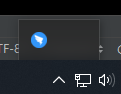
The mouse can be moved up on it, but clicking on it doesn't have any effect!
It is the process of IDEA, can be verified by Taskbar Icon Settings in Windows 10 system settings.

That useless after I close the option of "Display notification on build completion"

Please help me, thanks.
请先登录再写评论。
By the way, When this icon appears, it will display in taskbar until IDEA is closed
Please see https://youtrack.jetbrains.com/issue/IDEA-207320 .
The issue will be fixed in the next build to be published at https://www.jetbrains.com/idea/nextversion/.
So, I can only wait for the IDEA update to fix this problem?
Yes.
OK, Thank you.