Editor behaving strangely (can't enter >, quotes only accept one character)

hi there,
lately (i can't say for how long... not THAT long) my IDEA (2019.1.4 (UE) Build #IU-191.8026.42) is behaving really strange
on SOME occasions, i can't enter > (shift + <, german keyboard layout). i didn't yet find out how and when it doesn't work (sometimes it does, often it doesn't), it seems to kind of depent where in a project i am (Vue Component file atm)
additionally, quotes are inserted to accept only one character lately.
i write class="
it's autocompleted to class="" (like it should), but as soon as i type one letter, my caret jumps out of the string and some double-quotes are there...
i've made a gif kind of showing both problems 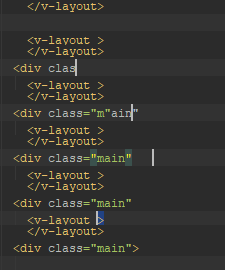
i don't remember changing any relevant settings (or any at all, for that matter) lately.
can anyone help me with this?
thanks in advance :)
请先登录再写评论。
Hello,
Could you please provide "Help | About" section?
Hi there!
Sure:
IntelliJ IDEA 2019.1.4 (Ultimate Edition)
Build #IU-191.8026.42, built on July 30, 2019
Licensed to *********
You have a perpetual fallback license for this version
Subscription is active until May 2, 2020
JRE: 1.8.0_212-release-1586-b4 amd64
JVM: OpenJDK 64-Bit Server VM by JetBrains s.r.o
Windows 10 10.0
Are these problems only relevant for IntelliJ IDEA, don't they persist in notepad, for instance? In case if they don't, could you try switching boot JDK to this build: https://download.java.net/openjdk/jdk11/ri/openjdk-11+28_windows-x64_bin.zip
See manual on how to switch: https://www.jetbrains.com/help/idea/switching-boot-jdk.html