Import Error: No Module named .... when running pycharm debugger, even though the module exists

/Users/home/jack/venv/bin/python "/Applications/PyCharm CE.app/Contents/helpers/pydev/pydevd.py" --multiproc --qt-support=auto --client 127.0.0.1 --port 51365 --file /Users/home/jack/moengage/jack/run_app.py
pydev debugger: process 41024 is connecting
Connected to pydev debugger (build 191.7479.30)
Traceback (most recent call last):
File "/Applications/PyCharm CE.app/Contents/helpers/pydev/pydevd.py", line 1758, in <module>
main()
File "/Applications/PyCharm CE.app/Contents/helpers/pydev/pydevd.py", line 1752, in main
globals = debugger.run(setup['file'], None, None, is_module)
File "/Applications/PyCharm CE.app/Contents/helpers/pydev/pydevd.py", line 1147, in run
pydev_imports.execfile(file, globals, locals) # execute the script
File "/Users/home/jack/moengage/jack/run_app.py", line 1, in <module>
from app import app
File "/Users/home/jack/moengage/jack/app.py", line 1, in <module>
from moengage.api.falcon.app import FalconApp
ImportError: No module named api.falcon.app
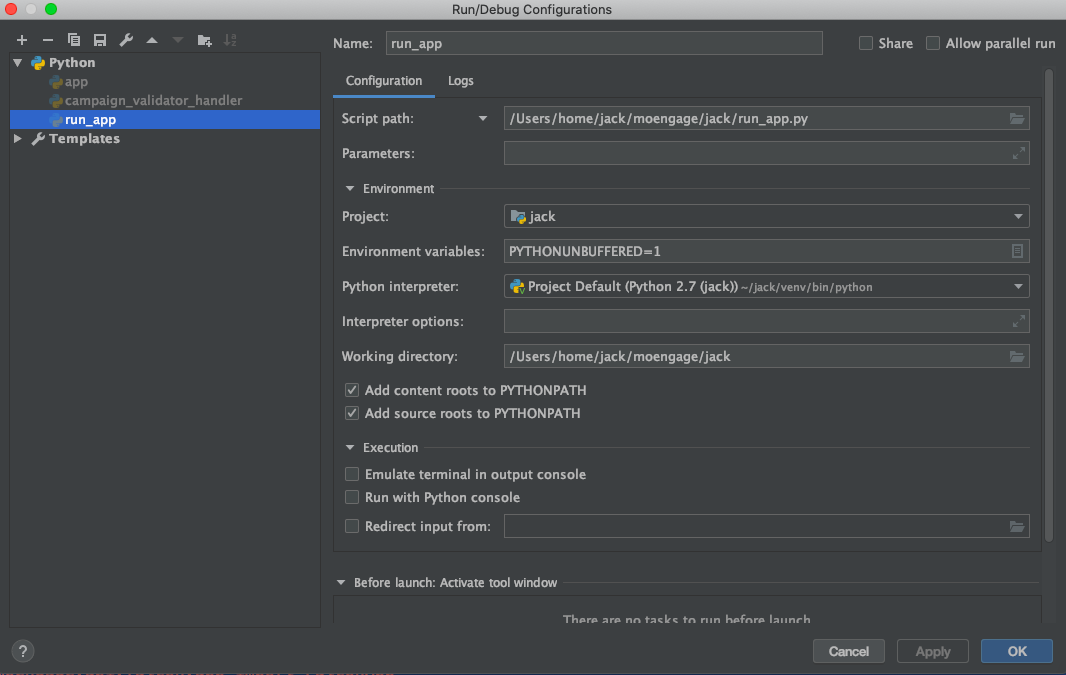
This is the debugger configuration.
请先登录再写评论。
Elizabeth Shashkova Can you please take a look at this. It is simiilar to this one https://intellij-support.jetbrains.com/hc/en-us/community/posts/205409290-ImportError-Idea-CE-with-python-when-debugging-import-module-has-issue-ImportError-,
but still not working. I have trying to fix thise from last 7 days, but still not successfull.
I am using a virtualenv with my project.
Hi! Does it work fine when you run it without debugger?
Hi Elizabeth Shashkova. I got the reason why it was breaking. I had installed a python library called "bson". And bson contains a file named "code.py". And it is a official bug of pycharm's debugger that if it finds any file named "code.py" it breaks.
https://youtrack.jetbrains.com/issue/PY-23615?_ga=2.115449669.2133347934.1574751633-964587983.1573479767.
SImply uninstalling bson fixed the problem.
Uncheck the checkbox before "Add content roots to PYTHONPATH" and try again
I had a similar problem (`ModuleNotFoundError`) that appeared only when debugging a certain test. Running it was no problem. Turns out that it had to do with name spacing and the way pytest imports tests. We switched the import mode (added the option `--import-mode=importlib` to the run configuration) and it works now.