How can I view log files in "Tool Window: Project"?
已回答

Please tell me.
I'm developing a web application that uses a Laravel project with IntelliJ, but log files output by Laravel are no longer displayed in "Tool Window: Project".
Of course, these log files are displayed in Finder App.
It may have disappeared because you accidentally changed some settings, but you don't remember what you changed.
Also, using Finder App to view log files during development is very cumbersome.
How can I view log files in "Tool Window: Project"?
OS: MacOS Catlina version 10.15.2
IntellJ: IntelliJ IDEA 2019.2.4 (Ultimate Edition) build # IU-192.7142.36, build on October 29, 2019

请先登录再写评论。
There can be two options, it's either a wrong directory or the files have weird permissions.
Please open Terminal, navigate to the logs folder, execute ls -la there and share the output here.
I have the same problem with laravel.log file. The files do exist but Intellij idea doesn't display them in the project window (neither in project view nor in project files view)
Emad Sa Ms, so, what about the files permissions?
Eugene Morozov, I use windows and the file has no special permissions.
Hello!
It's happening this also to me. Permissions are ok:
I ended-up deleting the file. With the next log created by laravel, I was able to find it via "find file" option, but it does not appear in the file tree although I use the "Reload from Disk" option.
I'll leave it like that.
> it does not appear in the file tree although I use the "Reload from Disk" option.
Same here, I'm on Windows.
IntelliJ IDEA 2020.3 (Ultimate Edition)
Build #IU-203.5981.155, built on November 30, 2020
Runtime version: 11.0.9+11-b1145.21 amd64
VM: OpenJDK 64-Bit Server VM by JetBrains s.r.o.
Windows 10 10.0
GC: ParNew, ConcurrentMarkSweep
Memory: 16300M
Cores: 12
Non-Bundled Plugins: PowerMouse, cc.duduhuo.git-conflict, com.alayouni.ansiHighlight, com.dmitryzhelnin.intellij.plugin.gitextensions, com.intellij.ideolog, de.netnexus.camelcaseplugin, uk.co.ben-gibson.remote.repository.mapper, CheckStyle-IDEA, EclipseCodeFormatter, io.codearte.props2yaml, wu.seal.tool.jsontokotlin, MavenRunHelper, de.dm.intellij.maven-archetypes-catalog-plugin, zielu.gittoolbox, com.cybrosis.catdea, com.jetbrains.edu, org.asciidoctor.intellij.asciidoc
Guys, please check if you have "Synchronize external changes when switching to the IDE window or opening an editor tab" option enabled in "Appearance & Behavior | System Settings", that should automate reload a little bit.
It seems more like a hidden filter on *.log files. Once I rename the file suffix, they reappear. I'm not aware of any filter settings in IntelliJ, though.
Could you please check if you have "Show excluded" option enabled in Project tool window? Also, just to confirm, are you in the "Project" built-in scope?
Thank you Vasiliy Yur for your help.
I have checked both things and they are both on, as you mention.
Sorry, I got no idea how to reproduce that -- the .log files appear on reload/autosync without any problems even if created apart from the IDE.
It could sound too obvious but did you try to disable all custom plugins already? Does it happen for new projects as well?
Hi Vasiliy,
>It could sound too obvious but did you try to disable all custom plugins already?
Not at all... For me the culprit was the Catdea plugin. Once disabled, log files are visible again.
Thanks!
Yes it worked for me as well. Thank you Vasiliy and Paradies!
Hi,
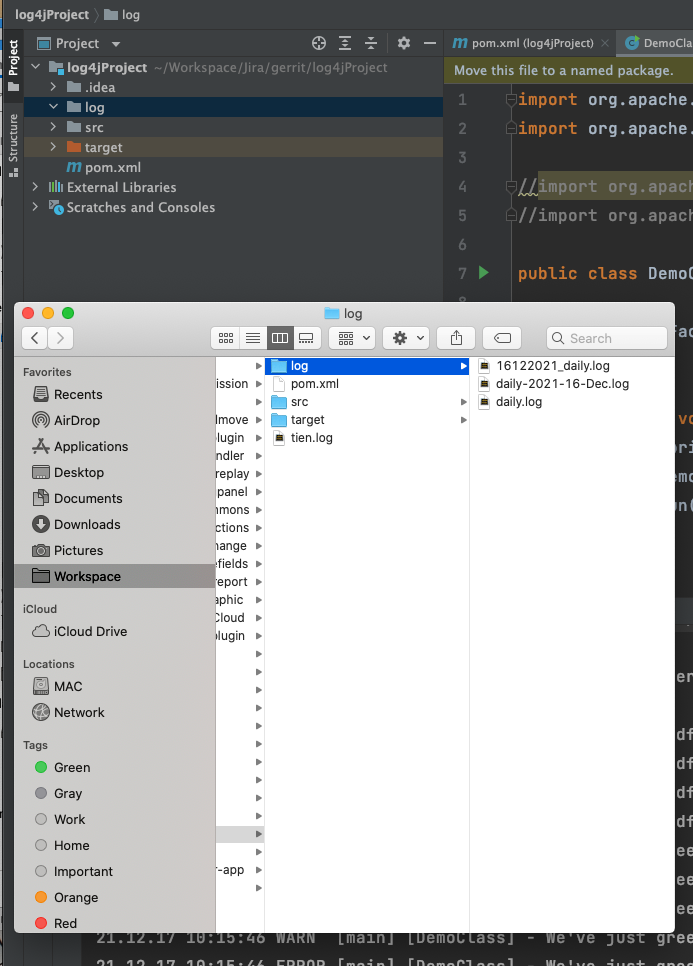
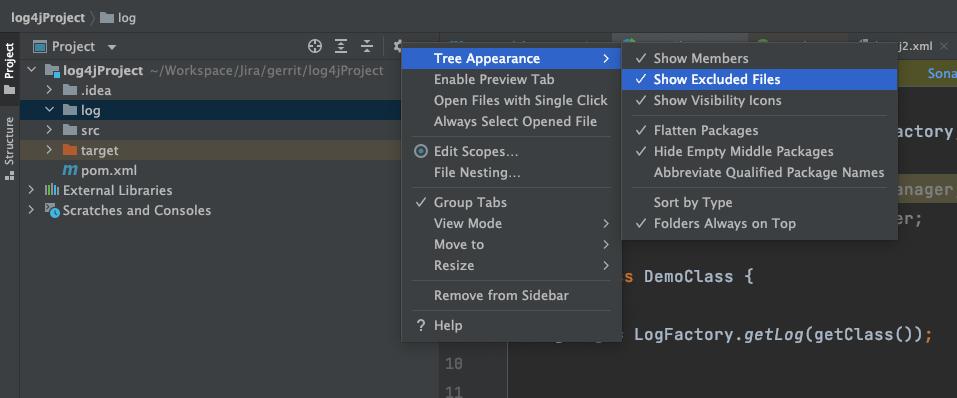
I have the same problem here. My project with "project" built-in scope and "Show excluded" option enabled.
But it still cannot see the log file in the Project tree.
I am using IntelliJ version 2021.3, Os: macos
Cheers
Hi Tien Dang
Hi Arina Efremova
Thank you for your help.
After "disable all downloaded plugins" the project tree show list of log files.
I detect if I enable the plugin "Catdea" the log file can now show.
Kind regards
Tien Dang
Edit
Fixed. For some reason the .log extension was listed as "ignored" in Preferences->Editor->File Types
---------------------------------
I've got the exact same issue: laravel log files are not visible in the tree. But in my case it must have a different cause. It seems to have something to do with the .log extension. In terminal:
```
logs git:(prof-dev-reimports) ✗ pwd
/Users/plweil-sa/code/wisconsin-idea/storage/logs
➜ logs git:(prof-dev-reimports) ✗ ls -l
total 5568
-rw-r--r-- 1 plweil-sa staff 69105 Dec 13 19:14 laravel-2021-12-14.log
-rw-r--r-- 1 plweil-sa staff 249166 Dec 15 10:23 laravel-2021-12-15.log
-rw-r--r-- 1 plweil-sa staff 1269059 Dec 16 17:27 laravel-2021-12-16.log
-rw-rw-r-- 1 plweil-sa staff 5074 Dec 17 18:22 laravel-2021-12-18.log
-rw-rw-r-- 1 plweil-sa staff 1007557 Dec 20 17:17 laravel-2021-12-20.log
-rw-r--r-- 1 plweil-sa staff 114758 Dec 23 09:22 laravel-2021-12-23.log
-rw-rw-r-- 1 plweil-sa staff 125778 Dec 27 13:02 laravel-2021-12-27.log
```
yes
see above
yes
yes, using .txt makes the file visible
yes