Checking PHP version of code

I have been looking at PHPStorm as it has features on displaying if a functions is depreciated in a particular version of PHP.
Is there a way to get a listing report for a complete project identifying which lines of code are depreciated rather than having to look through each script one page at a time.
Paul
请先登录再写评论。
Yes, you can do that.
Run "Run inspection by name" via Help > Find Action (Ctrl+Shift+A) > find "Deprecated" inspection for PHP and run it against the project.
See this illustrated: https://i.gyazo.com/3b38db995e6bd002e29bb31a9335354b.mp4
Found that OK but when I run it against the project or a single file it returns "No suspicious code found" even though I can see that there is a depreciated function in that script.
PHP 7.4 doesn't accept curly brackets and it is depreciated. That is correctly indicated in the file by a strike through in the code, but not when I do a Run inspection by name ...
Thanks, indeed. That's because this inspection isn't in "deprecated" group. It's a separate inspection, called "PHP | General | Curly brace access syntax usage". Not sure why.
You can do this now:
1) open File | Settings (Preferences on Mac) | Editor | Inspections.
Click a Gear icon against the Profile and select "Duplicate...."
2) Rename the profile to smth like "Deprecation check". Click on "Reset to Empty" to disable all default inspections:
3) Type "deprecated" in a search field and enable all deprecated inspections that you might need. You can enable those in "PHP | General" group to begin with.
4) type "language level" and enable that inspection also: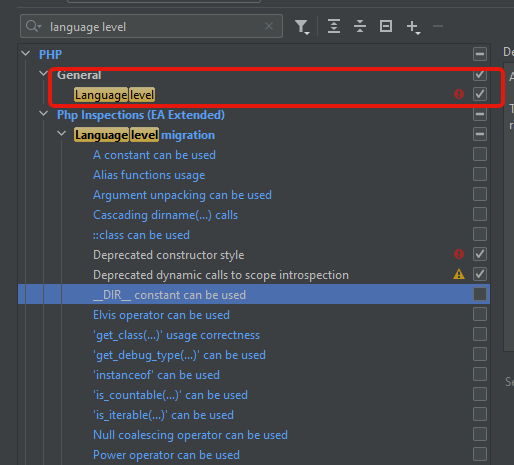
5) type "syntax" and enable aforementioned "Curly brace access syntax usage" inspection
Save the changes.
Now you can press Code (top toolbar) > Inspect Code... and then select the new "Deprecation check" inspection profile to run against the Whole project: