Project Interpreter Screen Has No Buttons At All

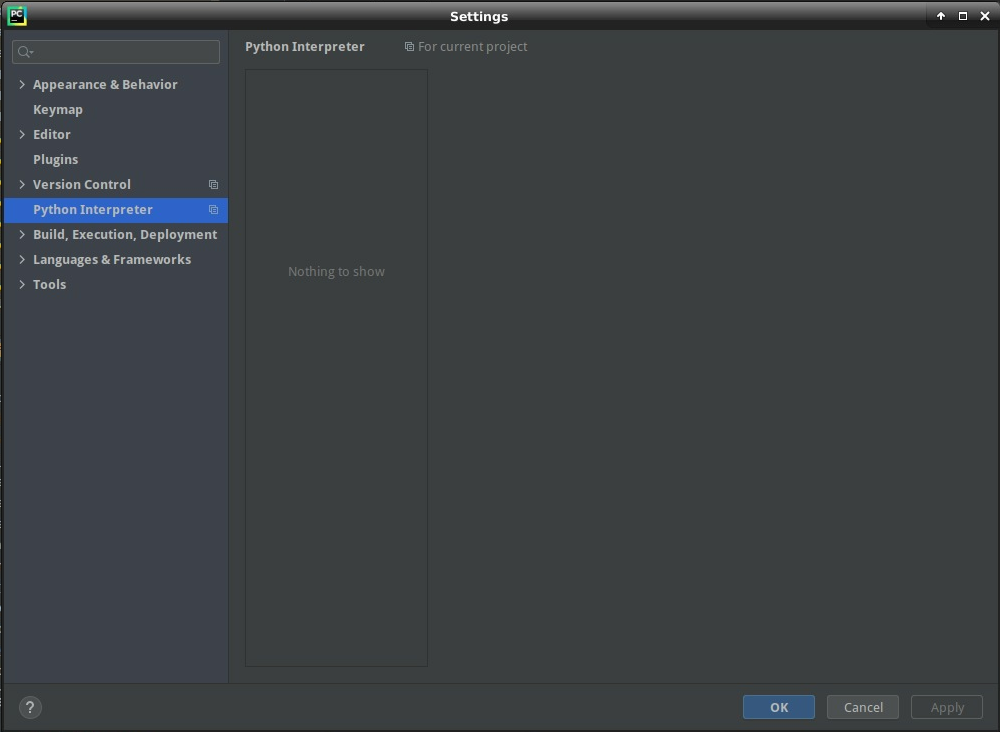
I'm running PyCharm 2020.2.3 Community Edition on a Google Cloud Platform n1-highmem-4 instance running Debian 10. I have Anaconda installed, and I want to point the Python Interpreter to the conda instance. But when I bring up the Settings menu item, and navigate to Python Interpreter, there are NO BUTTONS. Nothing. I can't do anything at all in this screen. Here's a screenshot. What's going on, here?
请先登录再写评论。
Hello,
Please try to delete .idea folder inside the Project directory and reopen it in the IDE. Has it helped?
Hi, Antonina! Yes, that fixed the problem, thanks! I now have both the Interpreter and the Structure options underneath the Project item in Settings. This feels like a distinct bug to me. Either that, or there should be a message to the user to recommend deleting the .idea folder.
Thanks again!