Why idea can compile at a language level higher than the SDK level for JDK9 (or later) and report invalid Source release for JDK8 (or lower)
已回答


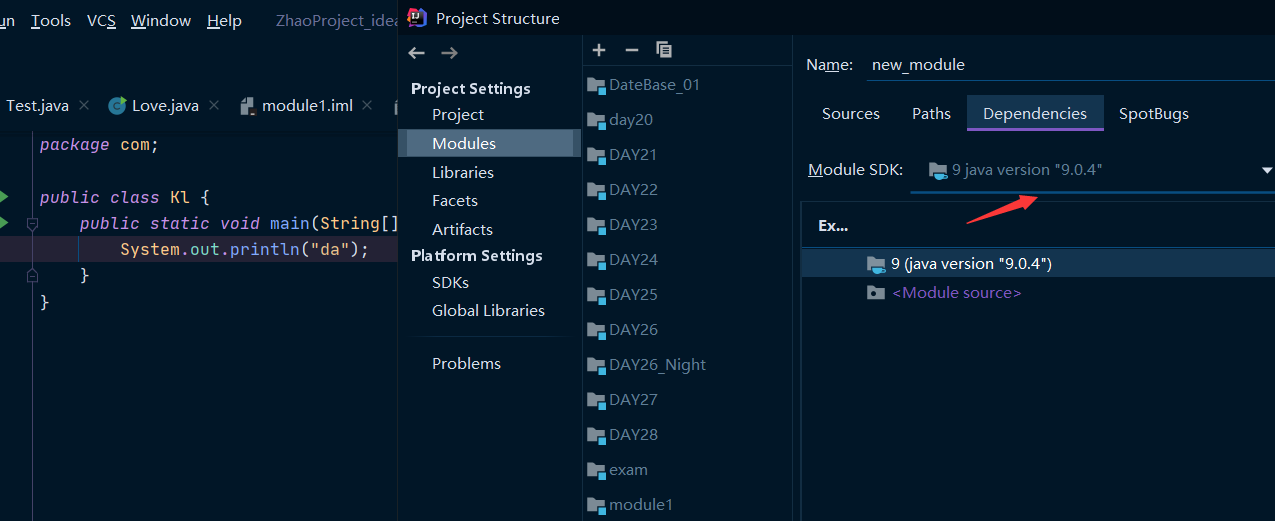

but when I change the module SDK to jdk8, the idea throws the error "invalid source release"!


when I set the module SDK to jdk8(jdk7, jdk6), and also set the module language level to 11, the result is the idea throws "invalid source release". But, when I just change the module SDK to jdk9(jdk10), the module language level is still 11, the idea could make a normal compilation
At first, I thought the language level was higher than the SDK level and would not compile properly, but Jdk9 and above versions can indeed compile at a higher language level than the module version like module SDK 9 with language level 14
请先登录再写评论。
Hello!
I've got the same error with JDK 9 as well. Could you please attach screenshot from "Settings | Build, Execution, Deployment | Compiler | Java Compiler"?
Actually not just in JDK9, Jdk9 + versions have the same situation. Only JDK8 and its lower versions could throw the "invalid source release" when the language level is higher than the module SDK version
When I set the module SDK to JDK9(JDK10, JDK11, and higher versions), even if I set the language level arbitrarily (even higher than the SDK version, such as 14), IDEA still compiles properly. As the following picture shows.
here, I change the module bytecode version to 9(because the default option is same as the language level )
The language level is 14, and the module SDK is version 11, but it's still compiled successfully!
Jasonzhao ..
I've got the same message with project SDK set to 11 and language level to 14/15. Please try to clean modules bytecode version in "Settings | Build, Execution, Deployment | Compiler | Java Compiler".