Blade Syntax Not Auto-completing (PhpStorm 2021.1.1)

After the PhpStorm 2021.1.1 update blade auto-complete has stopped working for me.
You can see from the picture below it shouldn't be green at all (Syntax seems to not be detected as well).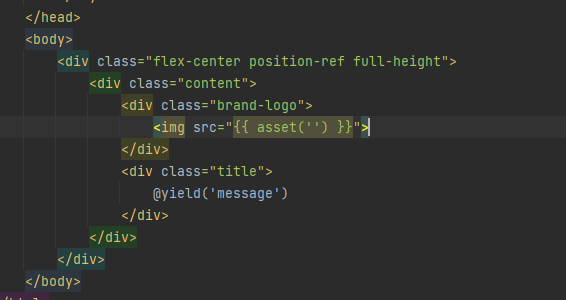
请先登录再写评论。
Is it a .blade.php file? Please check if the highlighting works correctly using the same file in a new project.
The file extension has always been .blade.php as I have used PhpStorm for multiple Laravel projects.
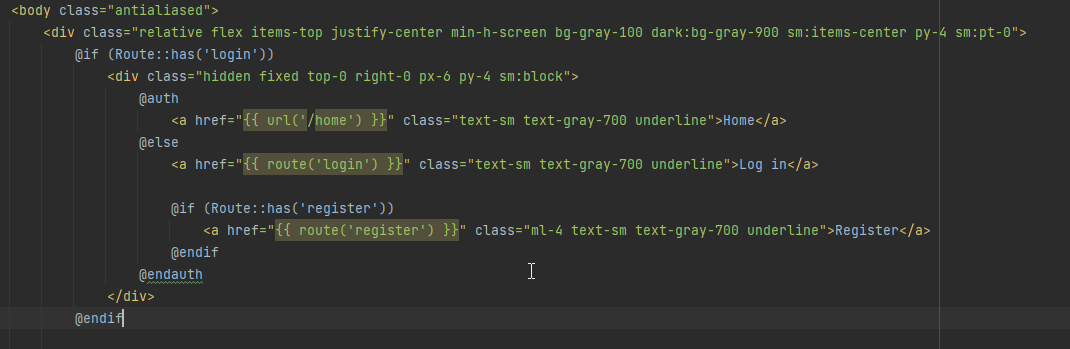
I created a new project and still the same issue as you can see from the image.
Could you please share the entire file? This works correctly here, if I use the snippets from your screenshots.
As I can't upload files here, you can find one of the files here: https://drive.google.com/file/d/1kZflMANCTLTKysQM-768SwoPSrk765EP/view?usp=sharing
Yes, looks good here. Do you have "Blade" plugin enabled at File | Settings (Preferences on Mac) | Plugins? Please also try disabling all custom plugins at Settings | Plugins > click on a gear icon > "Disable All Downloaded Plugins", restart IDE and check the issue after that.
The "Blade" plugin is enabled.
I disabled all downloaded plugins, restarted and still get the same issue as you can see from the image below.
Thanks for a full screenshot! Your .blade.php files are actually not associated with Blade templates.
Please check that you have defaults for Blade file types:
and you don't have .blade.php files associated with pure PHP file type:
This can be checked at File | Settings | Editor | File Types.
Resolved my issue, wonder why it was reset or removed from that list as I only updated PhpStorm using the Toolbox process.
Thank you though for your help.
What was the problem exactly? Empty file pattern list for "Blade" file type?
The .blade.php files were not associated with Blade templates for some reason.
Could you please run Help > Collect Logs and Diagnostic Data and upload resulting archive to https://uploads.jetbrains.com/? I'll check if there's anything related in the logs.
Here is the upload ID: 2021_04_27_xrPyFWwYJofLcPPu
Thanks! Unfortunately I can't see any hints to why this had happened, sorry.
If this happens again - just post back here, we'll take a closer look at this again.