How do I get the IDE to respect our tabs settings when pasting code?

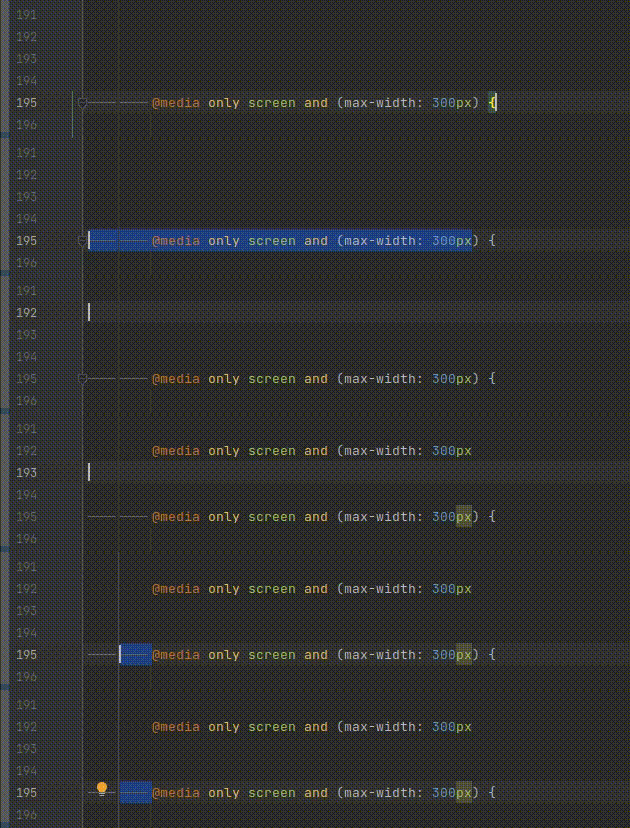
Very confused about this behaviour. As you can see above, even when the editor's language settings is set to use tabs and you are copy-pasting content with tabs in it, it converts it to spaces.
Is this a bug or is there a hidden setting somewhere? There's no instance where we would *desire* copy pasting to override the language preference and convert tabs to spaces.
请先登录再写评论。
Hi there,
1. Does it remove tabs (converts to spaces) on Code Reformat?
Make some test code that uses mixed tabs and spaces. Then reformat it (Code | Reformat Code) -- what is used now?
Does the IDE use correct indent symbols when you just writing new code?
2. What are your indentation settings? Show what Code Style has for this language + the Status Bar fragment for the same (and the menu that it shows)
3. What kind of file that is (what language)? Is it a whole file (e.g. whole file is a CSS/Sass/etc) or it's a partial file (e.g. <style> section inside HTML; a template language is used etc)
4. What do you have at "Settings/Preferences | Editor | General | Smart Keys | Reformat on paste" ?
If you set it to None, will it work as intended?