Where is the "Enable automatic completion on typing" option on PyCharm 2026.1.2

Hi, I'm quite new to PyCharm and while the in-line completion suggestions are great most of the time they can be quite intrusive.
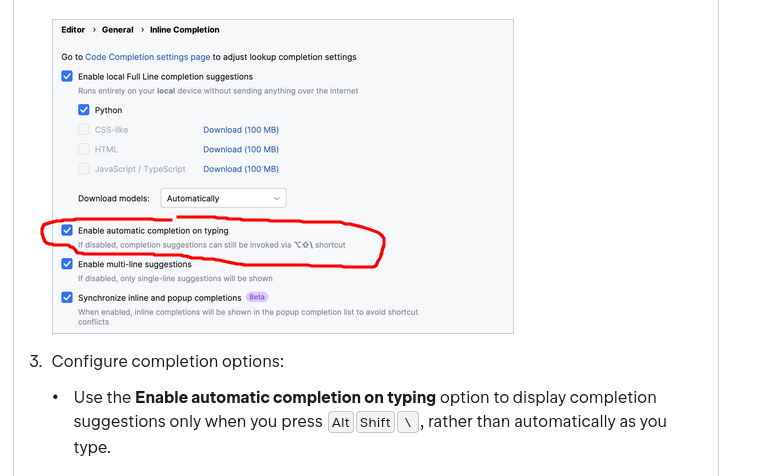
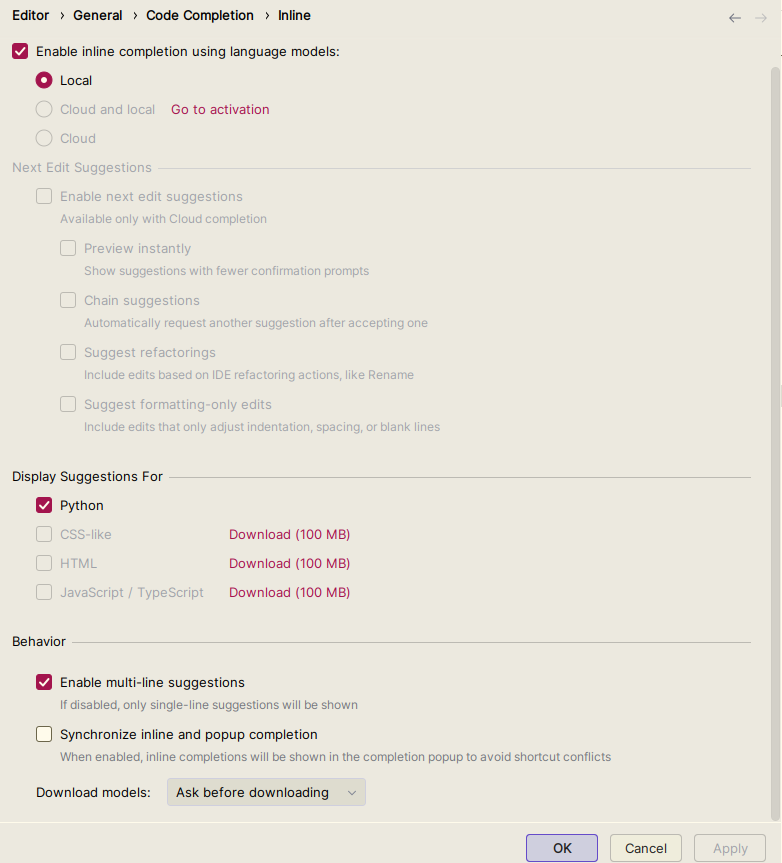
The docs seem to suggest that there is a "Enable automatic completion on typing" option which when disabled will only show the suggestions when you actually use the hotkey to show the suggestions, however my PyCharm lacks that option, has it been moved somewhere?
Attached screenshots of what the docs has and what I have, thanks.
请先登录再写评论。
Hi Cthulhu345, the option is still there, it just moved. In 2026.1 the code completion settings were reorganized, and
Enable automatic completion on typingwas taken out of the main Inline panel and placed under Advanced Settings.To find it:
1) Open Settings | Advanced Settings
2) Scroll down to the Code Completion section
3) Uncheck
Enable automatic completion on typingWith that box unchecked, inline completion stays enabled, but suggestions no longer appear on their own as you type. This redesign is tracked in IJPL-243388. The help page still shows the old layout, and we are getting it updated.
@stickman hook
Thanks for explaining this! I was wondering the same thing since the option shown in the docs doesn't seem to be where it used to be. PyCharm has so many settings that it's easy to miss something like this. Hopefully this helps other beginners who find the inline suggestions a bit too intrusive.