Find in Files - terrible contrast on file names

Who came up with the foreground/background colors of the file names on the right and how do we tell them they should never design an interface again?
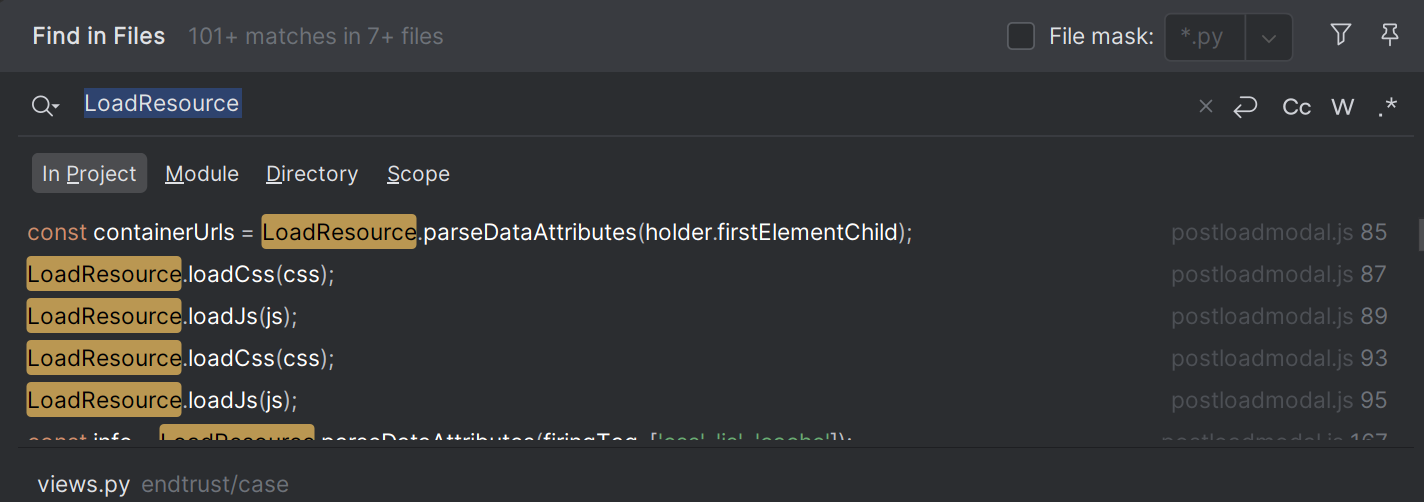
Could you choose any more grey - any farther from LEGIBLE, CONTRAST?
What option can I set to change these colors? If there isn't one, can a feature be added to Settings to allow me to fix this? Or even better… just fix it in the light and dark themes?
请先登录再写评论。
Hi Chris
We have an old ongoing case regarding this:
https://youtrack.jetbrains.com/issue/IJPL-50059/Find-in-Path-Find-in-Files-Foreground-Color-for-Duplicates-Not-Legible
Unfortunately, there is no way to change the colour scheme specifically only for Find in Files.
We apologize for the inconvenience.
As a workaround, if you are OK with making many UI elements contrasting, try creating a custom theme plugin with the following settings:
I have reached out internally to raise the youtrack ticket priority but also feel free to comment/follow for further updates.
Kind regards,