Used variables appear as unused symbol
已回答

I am using IntelliJ Enterprise 2026.1.3. Recently, I have reinstalled my Mac, as well as IntelliJ. Since then, I notice that, my used variables are displayed as unused variables/symbols (grayed out), even though there is clearly indicator “xx usages”, as Screenshots.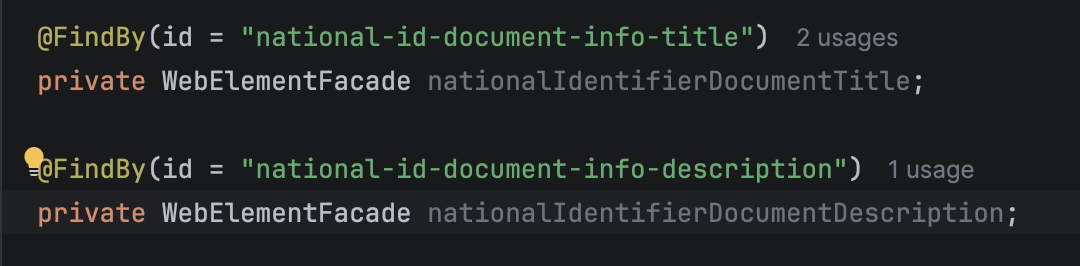

I have looked under:
Settings > Editor > Inlay Hints > Code Vision > Java
or
Settings > Editor > Color Scheme > Java > Unused symbol
but nothing helped. Before reinstallation, the used variable appeared highlighted.
Does anyone have any idea? Thanks
请先登录再写评论。
Hi Louis Tran , the screenshots mean the usage search behind Code Vision is right. Only the "unused symbol" highlighting color disagrees with it.
Please go to File | Invalidate Cache | enable 1,2, and 3 option | Invalidate and Restart.
If the issue persists, please help to reproduce this issue and capture logs via Help | Collect Logs and Diagnostic Data, upload the zip file to https://uploads.jetbrains.com/ and share the uploadID with us, thanks.
Meanwhile, please check if the issue still exists in 2026.2.x or not.
Hi Jerome Guan , thank you for your reply. I have tried this option before already. Here what I have observed:
- When IntelliJ just restarted, these variables were highlighted (with the color of my theme), but the indicator “xxx usages” were still not displayed, because the project was still being imported (status at the bottom of IntelliJ).
- As soon as the indicator “xxx usages" were displayed or project's importing was done, then these variables were grayed out again.
It seems there is some conflicted settings, but I can't figure out what it is.
Hi Louis Tran , thanks.
May I know if this issue happens with these three variables only?
Is it possible for you to share a reproducer project with us? If yes, please upload the project to https://uploads.jetbrains.com/ and share the uploadID with us, thanks.
Another option is to download a standalone 2026.2.2 build from https://www.jetbrains.com/idea/download/ and install it. Please do not import any settings, and open the same project then check if the issue persists or not.
The settings may be project-specific. Another option to try is the following:
Hi Jerome Guan ,
Just want to share the reason to cause this behaviour and the solution:
- Cause:
I declare WebElementFacade fields with @FindBy annotation. IntelliJ is not saying these fields are unused. It is saying (when hovering on the field): “
Private field 'xxx' is never assigned”.That's why it is greyed out despite Code Vision showing
1 usage.The reason is Serenity's runtime injection. As mentioned above, I declare these fields with @FindBy annotation and Serenity/PageFactory populate these fields dynamically. IntelliJ's static analysis doesn't currently recognize
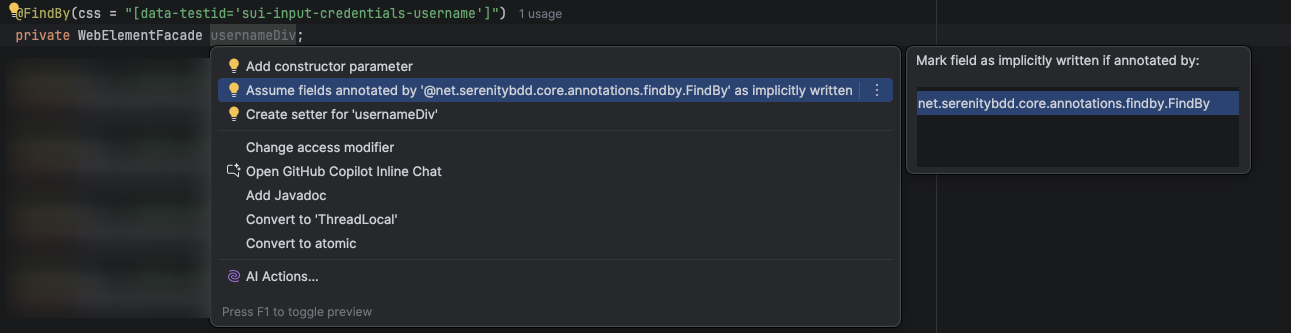

@FindByannotation as something that implicitly writes to the field.- Solution:
Hover on the field, choose More Actions and choose option “Assume fields annotated by ‘@net.serenitybdd.core.annotations.findby.FindBy’ as implicitly written"
This option teaches IDEA that fields carrying that annotation are implicitly handled by the framework. A genuinely unused field can still be detected; this only teaches IntelliJ about the runtime injection semantics of Serenity's
@FindBy. It means, if a field with @FindBy annotation is not used, it will still be greyed out.So after choosing this option, the field is highlighted as for used field.
Thank you for sharing your findings. That's a great analysis.
You're right: IntelliJ IDEA doesn't know that Serenity's `@FindBy` populates the field at runtime, so it reports "never assigned" and grays the field out, even though Code Vision correctly shows the usage. Your explanation also matches why this changed after the reinstall. That "implicitly written" annotation setting was most likely stored in your previous IDE configuration and wasn't carried over to the fresh installation.
One tip: if you want this to persist across reinstalls or apply for your whole team, you can save the setting in a shared project inspection profile under Settings | Editor | Inspections.
I have created a ticket for future future improvements and you can upvote it here: IDEA-394425 Recognize Serenity @FindBy as an implicitly written field annotation (https://youtrack.jetbrains.com/issue/IDEA-394425)
Feel free to reach out to us if you have any questions.