Not seeing how to open another project from the Welcome screen

This screen is very useful when I open PHPStorm:
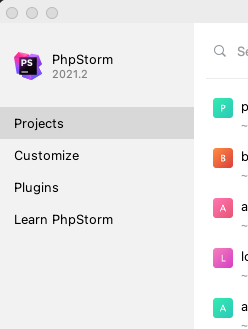
I can just click on a project to open it.
However, if I have one project open and I want to open another one at the same time, I can't get that window until I close all projects.
The closest I see to getting this window is File > Open, but that just opens a Finder window, which is typically not anywhere near where my projects are, and I have to go dig for it.
I can use File > Open Recent, but not everything is recent.
Am I missing the button to open the Welcome screen, or should I just be using Recent? I thought the Welcome screen showed a view of all projects I use in the editor, not just the most recent.
请先登录再写评论。
Hi there,
File | Open recent | Manage Projects... -- you can assign a shortcut if you do not want to access it via menu.
Or just install Frame Switcher plugin and use it.
OK Manage Projects looks like the Welcome screen project list, that's helpful.
I don't understand what you mean by assign a shortcut though.
Keyboard shortcut.
Each action can have a keyboard shortcut assigned so you can access it via keyboard (faster than using the mouse and main menu).
OK thanks