DataGrip SQL Code Style - List Items Wrapping not Chopping

This question has also been asked on Stack Overflow:
I've been messing around with the Code Style options in PyCharm (but for SQL, hence the DataGrip title):

Although I can get almost everything to the style that I use, I can't figure out how to get lists to format how I expect
I'm hoping that answers to this question will show me which settings to change to get the behaviour that I want (explained below)
There's 2 behaviours that I want to enforce:
- The items in a list should always Chop
- The items in a list should be on a new line, indented once from the start of the opening line (not relative to the opening parenthesis, though)
I've changed all of my wrapping options to Chop (or Chop If Long) across all of the settings and I've changed most of the alignment options to Wrapped Unindented (where I think it'll make a difference), but lists are still only wrapping if they're long and the alignment is not working as expected -- I can't figure out which options apply to lists
Current Behaviour (Not Wanted)
Short List
Consider the following query with a short list:
SELECT
    table_name,
    column_name,
    data_type
FROM information_schema.columns
WHERE 1=1
    AND table_schema = 'Schema'
    AND data_type NOT IN ('item', 'item')
ORDER BY
    table_name,
    ordinal_position
;
The 'Format Code' action (Ctrl + Alt + L) does nothing notable to this query
However, when I place the cursor before the first 'item' and click the enter key, it places the text on the next line but aligned with the opening parenthesis:
...
    AND data_type NOT IN (
                          'item', 'item')
...
Clicking the enter key with the cursor before the second 'item' and then the closing parenthesis leaves the code formatted like:
...
    AND data_type NOT IN (
                          'item',
                          'item'
                         )
...
Long List
Consider the following query with a long list:
SELECT
    table_name,
    column_name,
    data_type
FROM information_schema.columns
WHERE 1=1
    AND table_schema = 'Schema'
    AND data_type NOT IN ('item', 'item', 'item', 'item', 'item', 'item', 'item', 'item', 'item', 'item', 'item', 'item', 'item', 'item', 'item', 'item', 'item', 'item', 'item', 'item', 'item', 'item', 'item', 'item')
ORDER BY
    table_name,
    ordinal_position
;
Clicking the enter key with the cursor before the items behaves in the same way as described above
However, the 'Format Code' action (Ctrl + Alt + L) wraps these items and aligns with the opened parenthesis:
SELECT
    table_name,
    column_name,
    data_type
FROM information_schema.columns
WHERE 1=1
    AND table_schema = 'Schema'
    AND data_type NOT IN
        ('item', 'item', 'item', 'item', 'item', 'item', 'item', 'item', 'item', 'item', 'item', 'item', 'item', 'item',
         'item', 'item', 'item', 'item', 'item', 'item', 'item', 'item', 'item', 'item')
ORDER BY
    table_name,
    ordinal_position
;
Intended Behaviour
Regardless of the formatting method (enter key or Format Code action), the list behaviour that I want is:
SELECT
    table_name,
    column_name,
    data_type
FROM information_schema.columns
WHERE 1=1
    AND table_schema = 'Schema'
    AND data_type NOT IN (
        'item',
        'item'
    )
ORDER BY
    table_name,
    ordinal_position
;
Here, the list items are all on a new line, indented from the opening line, and not aligned with the opening parenthesis
Software Details
- PyCharm Pro version 2022.1 (Build #PY-221.5080.212)
- DataGrip plugin: Database Tools and SQL (bundled 221.5080.212)
- Microsoft SQL Azure version 12.0.2000.8 (very similar to Microsoft SQL Server)
Current Settings
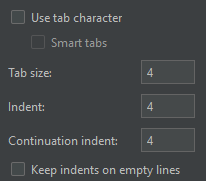
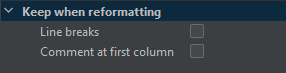
My current settings are included below -- all changes have been made to the 'General' settings with all dialects inheriting these settings
Case

Queries

DDL

Code

Expressions

Tabs and Indents
Wrapping
请先登录再写评论。
Seems there is no such setting.
Please submit feature request at https://youtrack.jetbrains.com/newIssue?project=DBE
Raised the following ticket for this:
* https://youtrack.jetbrains.com/issue/DBE-15550/Allow-List-Item-Chopping-in-Code-Style
Is there any update on this feature?
Will Burdett Not at the moment I'm afraid. Its implementation is not planned for version 2024.1.
You are welcome to vote up DBE-15550 and leave additional comments in the issue directly.