Remove Usage Overlay from Text Editor
已回答

Hi,
With a new version of IntelliJ, I am getting an overlay over every method/class/property about its Usage. (Attached a screenshot).
I am not very fond of this since at times cannot understand the line gaps, what is the process to not display this usage overlay.
Details:
IntelliJ IDEA 2022.1.3 (Community Edition)
Build #IC-221.5921.22, built on June 21, 2022
I am using a couple of Plugins. I don't think this is coming from any, but if this is not an Intellij feature, I can share the list of installed Plugins.
Screenshot: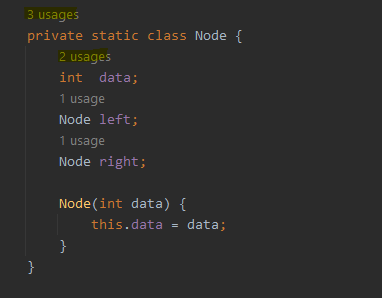
Thanks.
请先登录再写评论。
Settings (Preferences on macOS) | Editor | Inlay Hints | Code Vision | Usages.
Thank you for the quick response. I have been trying to find "Usage" under the Actions tab for days and found nothing. This is helpful.