Issue with weblogic and intelliJ
已回答

Hello,
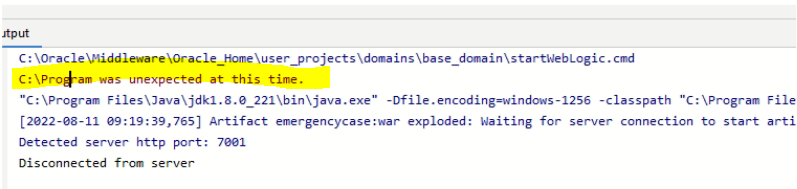
I have an issue when trying to start it from IDE displayed this error
Although I can start Weblogic from cmd using startWeblogic.cmd
Could you please help?
请先登录再写评论。
What IntelliJ IDEA and WebLogic versions do you use?
Please share the startWebLogic.cmd script at https://uploads.jetbrains.com and provide the ID here. Also share IDE logs via Help | Collect Logs and Diagnostic Data. Please also include the full text from the Output console in the IDE (the screenshot doesn't show all the parameters).
Upload id: 2022_08_11_6uJms3XCuYfZzpknFETs8x (file: startWebLogic.cmd)
Upload id: 2022_08_11_27xiHv1GUwVzZgnjvXdFUX (file: idea.log)
Weblogic version:12.2.1.3.0
console:
C:\Oracle\Middleware\Oracle_Home\user_projects\domains\base_domain\startWebLogic.cmd
C:\Program was unexpected at this time.
"C:\Program Files\Java\jdk1.8.0_221\bin\java.exe" -Dfile.encoding=windows-1256 -classpath "C:\Program Files\JetBrains\IntelliJ IDEA 2019.2.4\lib\idea_rt.jar" com.intellij.rt.execution.CommandLineWrapper C:\Users\interactive\AppData\Local\Temp\idea_classpath1689210807 com.intellij.javaee.oss.process.JavaeeProcess 62383 com.intellij.javaee.weblogic.agent.WebLogicAgent9
[2022-08-11 09:19:39,765] Artifact emergencycase:war exploded: Waiting for server connection to start artifact deployment...
Detected server http port: 7001
Disconnected from server
The log is truncated, can't see your IDE version. Do you use 2019.2.4 release? Does it help if you update to the current version available at https://www.jetbrains.com/idea/download/index.html?
startWebLogic.cmd you attached calls another script, please provide it as well: